

Managing Multi-Client LinkedIn Outreach: A Demand Gen Agency Playbook
Published · Zyaam Ali
Practical guidance for founders, B2B teams, and small agencies turning buyer signals into reviewed next actions.
Photo by Ryunosuke Kikuno on Unsplash
A campaign is ready, the client approved yesterday’s copy, and an operator has just changed the audience. Should it launch? A useful agency playbook makes that decision clear before anybody sends. This guide gives demand gen teams a repeatable campaign record, prospect review, launch checklist, reply routing, and reporting routine for multi-client LinkedIn outreach. Use it to move one client campaign from brief to sales handoff with an owner at every stage.
A playbook turns client strategy into a launch decision
A multi-client outreach playbook records what an operator should do, who decides, and what stops a campaign from moving forward. It connects client strategy to a reviewable prospect list, a specific sender, the approved messages, and an owned sales handoff. Store it where your delivery team already manages work, with a link from the campaign record.
Use one document structure across clients, but fill it with each client’s own context. The practical test is whether a trained backup operator can explain why a person is included and what they are allowed to say, without relying on the founder’s memory.
Gartner’s 2025 buyer survey release reports that 69% of B2B buyers found inconsistencies between suppliers’ websites and their sellers. The survey covered 632 buyers in August–September 2024. It is a buyer-reported finding, not a campaign conversion rate. Keeping the client’s offer and approved claims together is one practical way to address that problem.
Create the campaign record before building the list
Give every campaign a record connecting client, workspace, offer, audience, sender, copy version, reviewer, exclusions, and handoff owner. Choose a naming convention your operators can recognize, such as client / audience / offer / version. Keep approval history separate from the current status so a draft does not look ready just because an earlier version was approved.
| Field | Example value | Responsible owner |
|---|---|---|
| Client and workspace | Northstar Analytics / Northstar workspace | Account manager |
| Offer and claim boundary | Reporting-workflow review; no promised revenue gain | Client reviewer |
| Audience | Operations leaders at UK B2B agencies with a stated reporting problem | Strategist |
| Sender | Named client representative with authorized access | Profile owner and operator |
| Message version | Reporting review / version 2 | Copy reviewer |
| Exclusions | Customers, open opportunities, opt-outs, and assigned overlaps | Research operator |
| Approval state | Pending / approved / needs changes | Named client reviewer |
| Reply and sales handoff | Agency conversation owner → client sales lead | Account manager |
Northstar Analytics is fictional. The record and approval states are an agency working template, not a claim about built-in product fields. Add links to the relevant client brief and approved copy rather than creating several disconnected copies.
Review a prospect sample with evidence and exclusions
Review people against the client’s criteria before generating messages. Keep the original source, observation date, company fit, buying role, observed problem, and unanswered questions. A title match is useful context; it is not evidence that the person needs this offer now.
Resolve existing-customer and open-opportunity exclusions with the client’s sales team. Check duplicate contacts within the campaign and other active work. When clients have overlapping markets, agree how ownership is coordinated without exposing confidential client information.
| Prospect evidence | Decision | Reason |
|---|---|---|
| Target company; buyer requests advice about reporting delays | Include for review | Fits the brief and has a relevant observed problem |
| Target company; buyer describes rebuilding a reporting workflow | Include for review | Relevant project, with authority still to confirm |
| Target company; buyer compares reporting approaches | Include for review | Useful context for a question, not assumed intent to buy |
| Correct title; no source supporting the stated problem | Research further | Insufficient evidence for this campaign |
| Relevant problem; existing customer in the client’s CRM | Exclude from cold outreach | Coordinate with the current account owner |
Use the B2B lead-scoring guide if reviewers need a consistent way to separate fit from intent. A successful tool import is not a successful prospect review.
HeyReach’s campaign documentation provides a useful first-party example of exclusion scope: several filters operate within the same workspace. Check your tool’s actual scope rather than assuming a filter coordinates exclusions across all clients.
Approve the message package and define what changes reset approval
Send the reviewer the audience sample, offer, sender, connection note, first message, follow-ups, and next step together. Mark which version needs approval. A change to the offer, audience, claim, or sender should return to review even if yesterday’s copy was approved. Agree how minor corrections are handled.
Write from the actual prospect evidence. Reuse the message structure across campaigns while keeping the client’s substance distinct. Do not fill a missing source with invented familiarity or borrow another client’s proof.
This fictional message assumes the sender legitimately represents that offer and has read the cited observation. A follow-up should keep that context and add a useful detail, such as what the checklist covers. Stop or adjust the sequence when the person responds; do not continue as if the conversation never happened.
For more message and follow-up examples, use the LinkedIn outreach strategy guide. Keep campaign review focused on whether the message is relevant, supported, and easy to answer.
Use a launch checklist with a clear stop rule
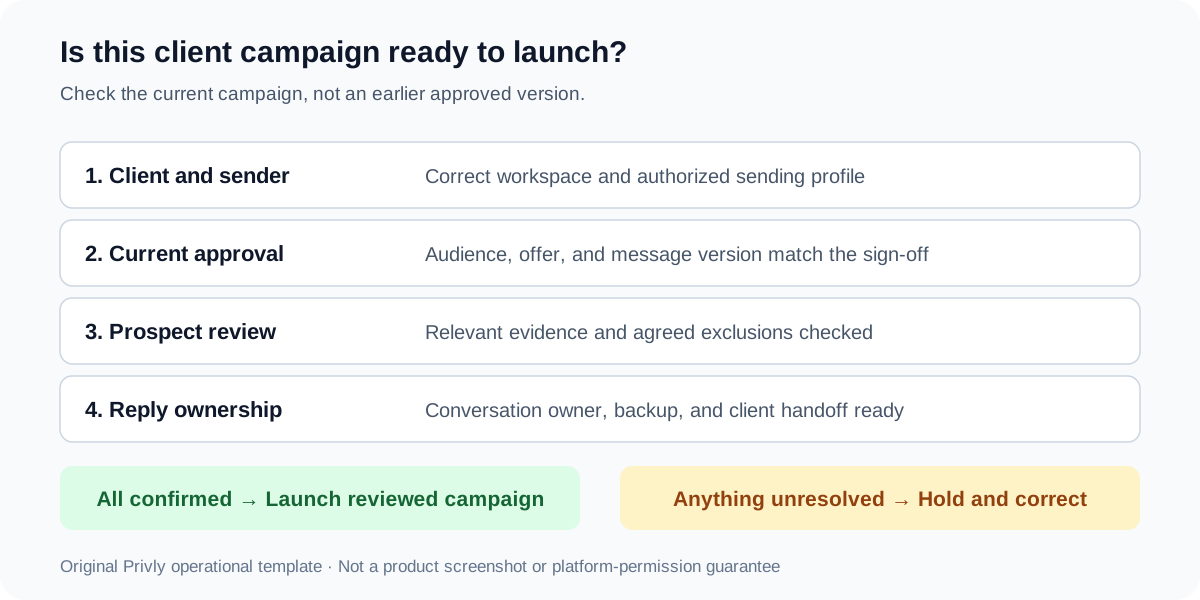
A launch check confirms that the current campaign matches the reviewed package. Read the actual client and sender shown in the application, then inspect the selected leads and message version. A similar campaign name is not enough. Pause the launch when one of those facts is unresolved.
- Client workspace and named LinkedIn sender match the campaign record.
- Audience sample and current message version have the agreed review status.
- Exclusions are applied to the intended list and their scope is understood.
- Personalization matches real prospect evidence and the client’s offer.
- Execution mode, timing, stop controls, reply owner, and backup owner are clear.
- Client sales contact and the handoff destination are ready to receive interested conversations.
LinkedIn’s policy prohibits unauthorized automated activity and warns of account restrictions. A checklist, client approval, or a vendor’s pacing claim does not establish platform permission. Evaluate the sending method and keep the profile owner involved.
Route replies and handle exceptions deliberately
Give each active conversation an owner and an agreed next step. The operator can triage routine interest, while the client answers commercial or technical questions outside the approved brief. Pass the source context, message already sent, buyer’s question, and proposed action together so the next owner can respond without asking the buyer to repeat everything.
When a sender disconnects or the wrong version is selected, stop affected work and identify what actually happened. Check delivery status before retrying. Reconnect through the owner’s normal process, correct the campaign context, and obtain any required renewed review before resuming. Do not assume an attempted action was delivered.
| Trigger | Immediate action | Condition for continuing |
|---|---|---|
| Wrong client or sender selected | Stop the affected launch and correct the selection | Workspace, sender, and approved package are confirmed |
| Prospect asks to stop | Stop pending follow-ups and record the exclusion | No further cold outreach to that person |
| Unsupported pricing question | Assign to the client specialist with conversation context | A supported response is available |
| Delivery status unclear | Inspect status before retrying | Confirmed delivery outcome and appropriate next action |
| Client changes the offer | Review the affected audience and sequence | Updated package is approved |
Make a CSV handoff usable for the client
A file export is a handoff artifact, not proof that the client has received or acted on a lead. Select the intended records, name the client and export date in your handoff note, confirm the destination, and explain how the client should reconcile duplicates and current owners.
Privly’s selected-lead CSV includes Name, Headline, Location, LinkedIn URL, ICP fit, Email, and Email verified at. Campaign history and approval records need their own accompanying context; do not assume the CSV carries every conversation or delivery event. Include only information the receiving team needs.
Close the week with outcomes and one useful decision
Report requests, accepted connections, unique people messaged, replies, positive conversations, booked meetings, held meetings, and sales-accepted opportunities separately. State the cohort, observation window, and denominator beside each rate. Ask the client to confirm the outcomes only their sales team can see.
Use the review to choose a specific next action: clarify the audience, change an unsupported claim, resolve specialist-response delays, or improve the handoff. Keep recent cohorts marked incomplete. Do not interpret a higher reply count as better performance when those replies are requests to stop.
| Question | Evidence to bring | Output |
|---|---|---|
| Who did we contact? | Audience and message version; exclusion changes | Confirm or revise targeting |
| What happened? | Cohort counts, rates, and conversation outcomes | Identify the main bottleneck |
| What needs the client? | Unanswered questions, meetings, and sales acceptance | Assign an owner and next step |
| What changes next? | One supported hypothesis and its review requirement | Record the next campaign version |
For a complete worked reporting example, see the multi-client outreach overview. If the bottleneck is team workload, use the agency scaling guide before committing to another client.
Apply the playbook in Privly
In the correct client workspace, review the business profile, qualify leads with source evidence, organize the audience in a list, and prepare messages and a campaign. Confirm the authorized sender and choose Manual or Outreach Autopilot for the reviewed steps. Export selected leads as CSV when the client needs a file, and keep handoff ownership explicit.
This brings research, lead organization, and outbound preparation into one workflow. Keep the client’s sign-off record, approved claims, and sales-outcome confirmations connected to that work. The agency playbook provides the working agreement; product permissions determine what each person can actually do.
Start with the campaign guide and check the workspace access guide before delegating. Build the first client brief with the ICP identifier.
Research checked October 5, 2026: Gartner buyer survey, HeyReach campaign documentation, and LinkedIn policy. Northstar Analytics, the prospect sample, messages, handoff note, and decision diagram are original illustrative material.
 Agency Growth
The Agency Guide to Scaling LinkedIn Outreach Across Multiple Clients
Scale your agency’s LinkedIn outreach with a capacity worksheet, clear delegation, delivery cost calculations, and practical checks before adding another client.
October 5, 2026 · Zyaam Ali Demand Generation
How Demand Gen Agencies Can Manage LinkedIn Outreach for Multiple Clients
Manage LinkedIn outreach across agency clients with separate workspaces, client approvals, sender ownership, reply handoffs, and a practical reporting template.
October 5, 2026 · Zyaam Ali Ideal Customer Profile
B2B Ideal Customer Profile Template: Examples for SaaS and Agencies
Create a B2B ideal customer profile with a practical template, SaaS and agency examples, sourced statistics, and customer analytics to test your assumptions.
September 30, 2026 · Giress Kenn