

How Demand Gen Agencies Can Manage LinkedIn Outreach for Multiple Clients
Published · Zyaam Ali
Practical guidance for founders, B2B teams, and small agencies turning buyer signals into reviewed next actions.
One client sells finance software. Another sells operations consulting. Both want meetings, both need a different message, and both expect you to know which conversations need attention. A demand gen agency can manage LinkedIn outreach for multiple clients by giving each client a separate working environment while sharing one repeatable delivery process. Here is how to organize targeting, sender accounts, approvals, replies, and reporting without mixing clients or measuring success by message volume alone.
Separate client context; standardize the process
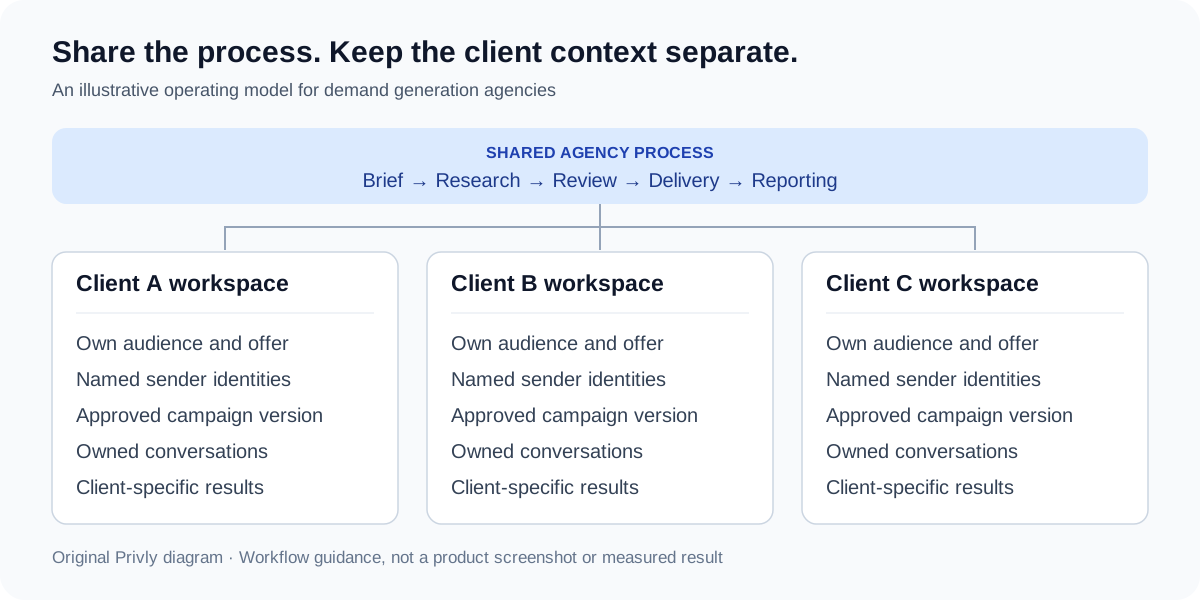
Multi-client LinkedIn outreach means running distinct prospecting and conversation workflows on behalf of different businesses. A sender is the individual LinkedIn member whose profile starts a conversation. A client workspace is where that business’s targeting, lead lists, approved messages, and results belong. Several senders may support one client; adding another sender does not turn it into another client.
Reuse the onboarding checklist, review steps, and report format. Keep each client’s offer, audience, sender identities, proof, exclusions, and conversations separate. A client-name tag helps people search; it does not replace access controls or prevent the wrong account from sending a message.
For a first-party example of this structure, HeyReach’s agency guide describes separate client workspaces and workspace-specific permissions. When evaluating any platform, inspect what it actually separates: senders, lists, conversations, integrations, and reporting—not just campaign names.
Why relevance and consistent claims matter
| Evidence | Scope | Agency takeaway |
|---|---|---|
| Gartner’s June 2025 release: 73% of surveyed B2B buyers avoided suppliers sending irrelevant outreach; 69% reported inconsistent information between supplier websites and sellers. | 632 B2B buyers surveyed in August–September 2024. These are buyer-reported findings from the same survey. | Approve both the audience and the claims. Check messages against each client’s current offer and website. |
| Expandi’s 2026 benchmark: 28.5% connection acceptance across 13,218,869 requests from 13,302 active accounts. | Expandi platform activity, May 2025–April 2026. Acceptance means accepted connections divided by requests sent; segmentation is sender-side. | Keep connection acceptance separate from replies and meetings. Treat the platform average as context, not a promised client result. |
Our practical takeaway: a repeatable agency process should protect relevance and message consistency before increasing volume. Compare client campaigns with their own previous results and comparable audiences, rather than imposing one target on every account.
Choose tools around the handoffs, not the feature list
A fragmented outreach stack usually creates work between tools: exporting a research list, correcting it in a spreadsheet, loading it into a sender, then reconstructing results for the client. Consolidation is useful when it preserves the client, source evidence, sender identity, and campaign status through those handoffs.
Before buying or expanding a platform, walk one prospect through the whole process. Where is the reason for inclusion stored? Who approves the claim? Which profile sends? Who owns the reply? What reaches the CRM? A tool that centralizes sending but loses these answers still leaves an operations problem.
| Job | Capability to inspect | Question to ask |
|---|---|---|
| Research and qualification | Client-specific targeting with original evidence | Can the reviewer see why this person belongs? |
| Campaign delivery | Explicit workspace, sender, execution mode, and stop controls | Can an operator act for the wrong client by mistake? |
| Reply handling | Conversation ownership and access | Who receives an interested reply when the operator is away? |
| CRM or CSV handoff | Selected fields, client destination, and duplicate rules | Will the receiving team understand the record and its source? |
| Client reporting | Defined metrics, dates, and client-only visibility | Can we reconcile the report with campaign and sales records? |
Step 1: Turn client onboarding into an approved brief
Start with one offer and one buyer group per initial campaign. Ask what a useful conversation looks like: the right role, a recognizable problem, a supported market, and a next step the client can deliver. Agree who accepts a lead into the client’s sales process. A booked call with the wrong company is still a targeting problem.
Build the brief from the client’s website, sales material, and current customer knowledge. Have the client correct it before prospecting. Record the approved version and date so a new operator does not have to reconstruct the strategy from chat history.
| Field | What to record | What blocks launch |
|---|---|---|
| Offer | The specific problem, deliverable, and supported claims | Unverified results or a changed offer |
| Audience | Company criteria, buying roles, region, and exclusions | An audience nobody can describe consistently |
| Sender | Named profile owner, relevance to the offer, and permitted operator | Unclear identity or permission to send |
| Prospect rules | Existing customers, open deals, opt-outs, and duplicate handling | No agreed exclusion process |
| Review | Client reviewer, approved copy version, and change rules | Nobody owns the approval |
| Handoff | Reply owner, CRM destination, qualification, and meeting rules | Interested prospects have no next owner |
Use the B2B ideal customer profile template to make audience criteria concrete. Keep a fresh brief for every client rather than copying one client’s exclusions and proof into another campaign.
Step 2: Give each client a separate workspace and sender map
Create a client-specific environment for lists, drafts, campaigns, reports, and integrations. Give operators access to the clients they actually manage. Before inviting a client, check their view: they should see their own work without gaining access to another business’s prospects or conversations.
Maintain a simple sender map: client, profile owner, campaign, responsible operator, and connection status. Check the active client and actual sending profile before every launch. A workspace selector and a sender selector answer different questions; both need to be right.
If two clients pursue the same prospect, agree an overlap rule. Assign outreach ownership or obtain an explicit exception rather than letting two campaigns compete silently. Coordinate using the minimum information needed; do not expose one client’s confidential opportunity details to another.
LinkedIn’s published policy prohibits unauthorized automated activity and warns that accounts can be restricted. Client consent and a low sending volume do not establish platform permission. Keep the account owner involved, avoid shared-password workflows, and evaluate the actual sending method before choosing an outreach tool.
Step 3: Approve a campaign package, not just a message
Give the client reviewer a small package: audience rules, a sample of prospects with reasons for inclusion, sender identity, opening message, follow-ups, exclusions, and the proposed next step. Reviewing copy without seeing who will receive it misses the most important part of relevance.
Keep the approved version attached to the campaign. Changes to the audience, offer, claims, sender, or follow-up sequence should return to the reviewer. Agree which minor corrections an operator may make without another approval. This is a working agreement you can manage in your project tool; do not assume a product role called Approver implements it automatically.
Keep the message grounded in the same evidence used to select the person. For connection requests, first messages, and follow-ups, use the LinkedIn outreach strategy guide rather than creating a different delivery process for every client.
Keep personalization specific as client volume grows
Standardize the research fields rather than turning every client’s message into the same template. For each prospect, keep the observed fact, source and date, likely problem, relevant client offer, and what still needs confirming. Those fields give a writer or AI assistant useful context; a first name and job title do not.
Keep a compact message brief per client: tone, supported proof, forbidden claims, and the next step. If evidence is missing, research it or exclude the prospect from that campaign. Do not replace a missing buying signal with an invented compliment or imply you have read a post you have not seen.
Review a sample whenever the audience, sender, or message version changes. Look for incorrect context, repeated wording, mismatched promises, and questions the client cannot answer. This lets the agency reuse a process while keeping each conversation recognizable to its recipient.
Step 4: Pilot the workflow and give every reply an owner
Start with a small, reviewable group selected under the agreed criteria. Check the actual sender, prospect context, personalization, exclusions, and handoff route before expanding. A pilot should reveal wrong assumptions in targeting and delivery; it is not permission to invent a universal daily sending limit.
A shared inbox can help operators find conversations, but each reply still belongs to a client and sender. Assign one responsible owner, keep the original context, and define when the client needs to take over. An agency can triage interest; the client may need to answer technical questions, confirm commercial terms, or join a meeting.
Agree response expectations around working hours and client availability. Log a handoff only when the next owner has enough context and accepts responsibility. If a person replies or asks to stop, remove them from pending follow-ups through the campaign’s supported controls and record the appropriate exclusion.
| Reply type | Immediate next action | Next owner |
|---|---|---|
| Interested; needs clarification | Answer the supported question or prepare the context for the client | Named conversation owner |
| Requests pricing or technical detail | Keep the question and original promise together; avoid guessing | Client specialist or sales lead |
| Ready for a call | Confirm fit and availability; record the agreed meeting | Client sales owner |
| Not now | Respect the timing request and record any agreed follow-up | Assigned operator |
| Stop contacting me | Stop pending outreach and update the exclusion record | Operator responsible for suppression |
Step 5: Report each client’s funnel with clear denominators
Report the audience, campaign version, sender, and observation window alongside results. Keep requests sent, accepted connections, unique people messaged, people who replied, positive conversations, booked meetings, held meetings, and sales-accepted opportunities separate. Define a positive conversation with the client before reporting it.
Track outreach cohorts rather than mixing this week’s requests with replies to last month’s messages. Pick a follow-up window before comparing campaigns and mark recent cohorts as incomplete. Client sales teams should confirm held meetings and accepted opportunities; an agency cannot infer pipeline from a calendar booking.
| Measure | Atlas Finance | Beacon Operations |
|---|---|---|
| Connection requests sent | 200 | 200 |
| Connections accepted | 60 / 200 = 30% | 80 / 200 = 40% |
| Unique accepted contacts messaged | 50 | 70 |
| People who replied | 10 / 50 = 20% | 7 / 70 = 10% |
| Positive conversations | 4 / 50 = 8% | 2 / 70 ≈ 2.9% |
| Meetings booked | 3 | 1 |
| Meetings held; sales-accepted opportunities | Confirm with client | Confirm with client |
In this example, each messaged contact belongs to the cohort of accepted connections; replies and positive conversations count people once. All numbers are fictional. Beacon has better acceptance, but Atlas has more positive conversations and bookings. That directs the next review toward Beacon’s audience, offer, and conversation—not automatically toward sending more requests. Different markets still prevent a claim that one client’s approach caused better results.
Keep an agency overview for workload, stalled approvals, unanswered conversations, and client-confirmed outcomes. Keep client reports limited to that client’s own data. If you aggregate rates internally, add the underlying counts and divide by the combined denominator; do not average percentages from differently sized campaigns.
A weekly operating rhythm for a multi-client agency
Use a short recurring review to find where work is stuck. Separate approval delays, research problems, account connection issues, unanswered replies, and client handoff delays. Each needs a different response; none is solved by increasing message volume alone.
Before adding another client, measure the time spent on research, review, reply handling, reporting, and rework. Include client feedback time and specialist questions. There is no useful universal clients-per-operator ratio without knowing these workloads.
- Before launch: confirm the client, sender, audience, exclusions, approved version, and reply owner.
- During delivery: inspect replies and sending issues; resolve wrong identity or access problems before resuming affected work.
- At the weekly review: reconcile outcome counts, identify the main bottleneck, and agree one change to investigate.
- When a client leaves: stop scheduled outreach, agree the data handover, remove agency access, and let the account owner manage their connection.
Common mistakes and questions agencies should resolve
Can one LinkedIn profile represent every client?
Make the sender’s relationship to the offer clear. A client employee and an agency representative are different identities. Choose a legitimate sender for each engagement, agree how they describe their role, and avoid implying they work for a company they do not represent.
Can we reuse the same message across clients?
Reuse the structure: relevant context, a supported problem, and an easy next step. Rewrite the substance for the client’s offer and actual prospect evidence. Copying another client’s results or product claims can create a misleading message even when the recipient’s name is correct.
What if a prospect is already in a client’s CRM?
Check existing customers, open opportunities, account ownership, and opt-outs before adding them to outreach. Agree whether the agency should exclude them or coordinate with the existing sales owner. Repeat this check when lists or CRM data change.
Does a centralized tool make outreach compliant?
Centralization helps organize delivery. It does not establish permission to automate LinkedIn. Review LinkedIn’s restrictions and the actual tool behavior; do not treat a vendor’s safety claim as a guarantee.
Replace the fragmented outreach stack with a client-by-client Privly workflow
Start with one client, one clear offer, and one reviewed audience. Make the sender, reviewer, conversation owner, and client sales owner explicit. Once that workflow works, reuse its operating steps for the next client while preserving separate targeting, claims, permissions, and results.
| Scattered workflow | Privly workflow | Keep client-specific |
|---|---|---|
| Research notes spread across tools | Review the business profile and qualify leads with their source evidence | Offer, ICP, observed need, and exclusions |
| A spreadsheet for each prospect list | Organize qualified leads in lists inside the client workspace | Client ownership and campaign audience |
| Copying context into a separate outbound sender | Prepare messages and campaigns from the reviewed lead context | Sender identity, tone, proof, and next step |
| Manually coordinating every sending step | Choose Manual or Outreach Autopilot for the campaign | Reviewed sequence, account constraints, and reply owner |
| Rebuilding files for client handoffs | Export selected leads as CSV when the client needs a file | Client destination, selected records, and handoff date |
Privly gives demand gen agencies a consolidated workflow for the research, lead organization, and outbound steps they would otherwise coordinate across separate tools and spreadsheets. Manage each client in its own workspace, carrying the reviewed business profile and prospect evidence through to messages and campaigns. Use the workspace access guide to review actual permissions; a role label does not grant access to another member’s sender or implement client sign-off. You can start by creating the client’s ideal customer profile.
When a client needs a file handoff, export the selected leads as CSV and keep the file associated with that client and campaign. Confirm the destination and reconcile it with the client’s existing records. For delivery, Privly supports Manual and Outreach Autopilot: choose how the reviewed campaign steps run, then monitor replies and outcomes. The campaign guide explains the modes and pause controls. Keep the client’s sign-off agreement and reporting definitions explicit; choosing an execution mode does not replace either.
Research checked October 5, 2026: Gartner buyer survey, Expandi platform benchmark, HeyReach agency documentation, and LinkedIn policy. The client names, approval worksheet, reporting example, and workflow diagram are original illustrative material.
 Demand Generation
Managing Multi-Client LinkedIn Outreach: A Demand Gen Agency Playbook
Run client LinkedIn campaigns with a reusable campaign record, prospect review, approval checklist, reply routing, CSV handoff, and weekly reporting routine.
October 5, 2026 · Zyaam Ali Agency Growth
The Agency Guide to Scaling LinkedIn Outreach Across Multiple Clients
Scale your agency’s LinkedIn outreach with a capacity worksheet, clear delegation, delivery cost calculations, and practical checks before adding another client.
October 5, 2026 · Zyaam Ali Ideal Customer Profile
B2B Ideal Customer Profile Template: Examples for SaaS and Agencies
Create a B2B ideal customer profile with a practical template, SaaS and agency examples, sourced statistics, and customer analytics to test your assumptions.
September 30, 2026 · Giress Kenn