

Privly vs Lemlist: Feature Comparison, Pricing, and Which Is Right for Your Team
Published · Zyaam Ali
Product and pricing research checked October 5, 2026
Photo by Boitumelo on Unsplash
Your agency needs relevant prospects, messages that reflect each client’s offer, and a clear owner for every reply. Should you build that workflow in Privly or Lemlist? Privly connects a reviewed business profile with LinkedIn discovery, qualification, messages, and campaigns. Lemlist combines lead research and intent signals with multichannel outreach. This comparison helps founders, sales teams, and Canadian agencies choose around their actual targeting, channel, collaboration, and budget needs.
Privly vs Lemlist: the short answer
Evaluate Privly when you want a LinkedIn-focused workflow built around the business you sell for: review its customer profile, qualify prospects, prepare messages, and organize campaigns in the same workspace. Evaluate Lemlist when coordinating email, LinkedIn, and calls is a central requirement. Both offer AI assistance; your decision should follow the work your team needs to complete.
For an agency, write down the number of clients, LinkedIn senders, operators, and channels before comparing plans. Three people reviewing campaigns is a different requirement from three people sending. A low starting price means little if you still need another service or extra sending seats to deliver the client’s brief.
Lemlist’s Multichannel plan adds LinkedIn actions and calling to email outreach. Privly’s current plans organize capacity around LinkedIn senders, workspaces, team members, and usage allowances.
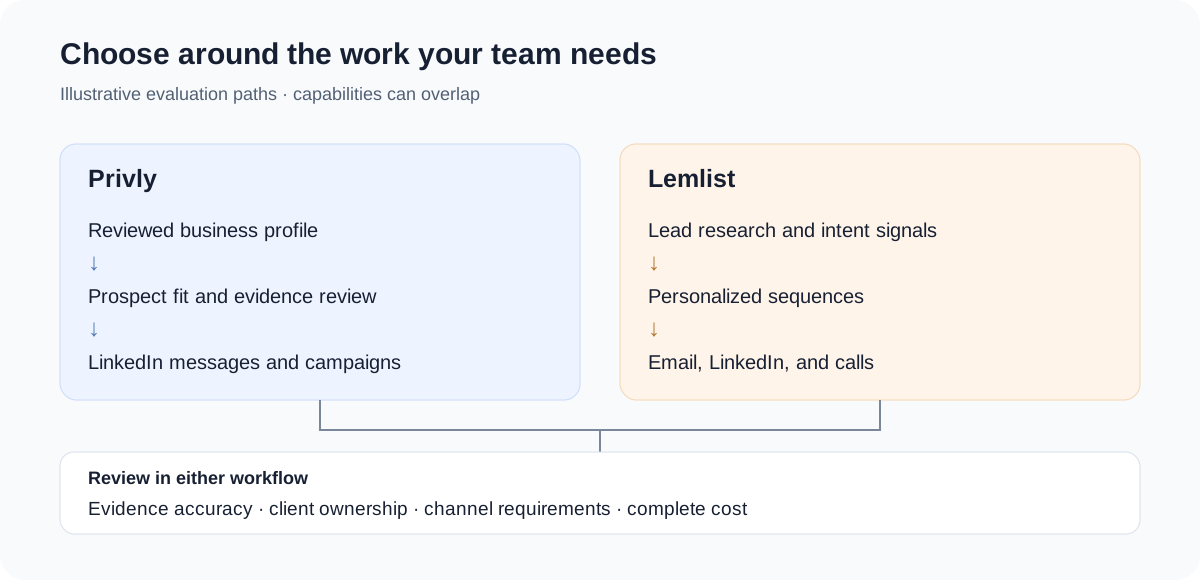
Features: compare the workflow, not the AI label
| Reader task | Privly | Lemlist |
|---|---|---|
| Define who the offer serves | Business profile generated from a website or answers, then reviewed | Lead research, audience segmentation, and AI context for outreach |
| Use intent in targeting | Evaluate evidence against the reviewed profile and customer fit | Monitor signals including hiring, funding, website visits, and LinkedIn engagement |
| Prepare relevant messages | AI-assisted drafting and personalization using reviewed offer and prospect context | AI message generation and personalization using research and custom variables |
| Execute campaigns | LinkedIn campaigns with Manual Outreach or Outreach Autopilot | Multichannel sequences including email, LinkedIn, and calls on the relevant plan |
| Organize agency work | Agency plan with separate client workspaces and pooled LinkedIn sender capacity | Team roles, paid sending seats, and guest access; review the account structure for each client |
| Move lead records | CSV exports; integrations vary by plan | CRM integrations and API listed on the pricing page |
Sources: Lemlist plans, intent signals, AI features, and Privly’s pricing and setup guide.
Intent signals: ask what the evidence changes
Lemlist’s intent-signal documentation includes behavioral and company events. For Privly, the useful evaluation is whether the evidence remains connected to your reviewed customer profile and the outreach decision. In either tool, a signal needs interpretation: a company hiring may fit your offer, but hiring alone does not prove the person wants to buy.
Personalization: review the reason for the message
Lemlist describes research from websites and LinkedIn bios and AI-assisted copy. Privly uses reviewed business and lead context to prepare outreach. Compare a draft’s accuracy and relevance: can the reviewer explain the offer, identify the supporting evidence, and remove an unsupported assumption? A first name or company mention is only the beginning.
Agency collaboration: separate access from sending capacity
Map each client to its business profile, prospect list, sender, campaign reviewer, and reply owner. Then check how a new operator gains access and what happens when that operator leaves. Client context should remain clear from research through the final handoff.
Privly’s Agency plan includes ten client workspaces and ten pooled LinkedIn senders. Decide which sender belongs to each client and how your agency will approve campaigns. Having a workspace does not replace an approval agreement or a reply-routing process.
Lemlist’s LinkedIn account guide specifies one LinkedIn profile per Lemlist account and separate seats for multiple profiles. Its seat guide distinguishes paid sending access from guest oversight, while the agency role guide describes Admin and Member roles. Check both role and seat status when estimating access for your team.
- Write one row per client: profile, workspace or team, sender, reviewer, and reply owner.
- Confirm what an operator can view before giving access to client records.
- Keep a record of exclusions, active conversations, and approved copy.
- Test the handoff of a reply and a lead record during your pilot, before migrating active work.
Use the multi-client outreach overview for workspace boundaries, the agency scaling guide for capacity planning, and the campaign playbook for launch and handoff checklists.
Pricing: compare LinkedIn capacity on the same billing term
Checked October 5, 2026: Lemlist’s plan guide lists Email starting at $69 per month for 50,000 emails, with unlimited users and senders, and Multichannel Expert at $109 per user per month on monthly billing. Email does not include LinkedIn actions, so the relevant starting point for this LinkedIn comparison is Multichannel. Enterprise is custom priced.
The figures below use USD and monthly billing. Lemlist supports other billing currencies and commitments according to its billing overview. Canadian teams should account for currency conversion and applicable taxes when budgeting. An annual monthly equivalent is not the same commitment as a month-to-month subscription.
| Plan | Monthly USD | LinkedIn senders | Workspaces | Team members |
|---|---|---|---|---|
| Founder | $79/month | 1 | 1 | 3 |
| Sales Team | $249/month | 3 | 1 | 10 |
| Agency | $549/month | 10 pooled | 10 | Unlimited |
See Privly pricing for current lead, monitoring, AI-draft, enrichment, and integration allowances. Sending capacity and teammate access are separate: a plan with three LinkedIn senders does not mean only three people can collaborate.
Lemlist’s account documentation explains the one-to-one LinkedIn connection per account. The five senders shown on its Multichannel pricing page should not be interpreted as five LinkedIn profiles per seat; its plan guide identifies the allowance as five sending email addresses per user.
Budget for the complete workflow
Record the subscription, required data or channel add-ons, email infrastructure if used, and operator time. Then record what your existing stack can actually retire. A consolidated tool saves work only when it covers the tasks and records your team depends on.
For a LinkedIn-focused agency, client workspaces and sender capacity may determine the budget. For an email-led team, mailbox setup, deliverability work, and multichannel coordination may matter more. Cost per sending account is useful, but it should sit beside a channel and workflow checklist.
Lemlist’s pricing page separately lists data enrichment and buying-signal add-ons. Its signal page discusses usage credits. Confirm the current signal package, included usage, and extra costs for your proposed setup; do not assume every signal is unlimited within the base seat price.
| Budget item | What to record |
|---|---|
| Subscription | Plan, billing term, currency, sending seats, and workspace capacity |
| Data and AI usage | Included allowances, expected usage, and top-up terms |
| Channel infrastructure | Mailbox, domain, phone, or other channel costs actually needed |
| Operator work | Research, draft review, reply handling, and reporting time |
| Retired tools | Services you can stop paying for after a successful migration |
Canadian agencies: build compliance into the campaign brief
A Canadian outreach workflow needs a record of who is being contacted, the basis for sending, the business being represented, and how a recipient can opt out. Put those decisions into the campaign brief before choosing the sending mode. Client approvals should cover the audience and message as well as the service being offered.
The CRTC’s CASL guidance describes consent, identification and contact information, and an unsubscribe mechanism as requirements for commercial electronic messages. Its social-media FAQ explains that direct messages through closed two-way social-media systems can fall within CASL, with platform use and circumstances affecting applicability.
Treat Canadian requirements as part of your operating process in either product. A LinkedIn connection, AI draft, or approved campaign is not by itself a determination of consent or an exemption. Record the applicable basis and opt-out handling for the outreach you intend to send.
- Record the sender and client represented, alongside the prospect and audience source.
- Document the applicable consent basis or exemption before commercial outreach.
- Review identification, contact details, and opt-out handling for the channel.
- Assign an owner to suppress further contact after an opt-out.
- Carry relevant exclusions and contact history into a migration or client handoff.
Also review LinkedIn’s prohibited-software policy before using automation. Platform rules and Canadian legal requirements are separate obligations; campaign pacing does not establish permission under either.
Run a pilot before moving active client campaigns
Choose one client, one clearly defined segment, and one offer. Write acceptance criteria before trying either product: the reviewer must understand why a lead fits, why the opening is relevant, who sends it, and who handles the reply. Keep those criteria stable so a different audience is not mistaken for a software improvement.
Use comparable, separate prospect samples. Do not contact the same person from both tools at the same time. Keep a human decision point for the first campaign, then evaluate how much preparation and handoff work remains after the team has learned the workflow.
| Measure | How to record it |
|---|---|
| Preparation time | Minutes from a reviewed brief to a campaign ready for approval |
| Lead relevance | Accepted leads divided by reviewed leads, using the same criteria |
| Draft accuracy | Unsupported claims and substantive corrections per reviewed draft |
| Handoff quality | Whether the reply owner receives the lead, evidence, and conversation context |
| Campaign outcomes | Delivered messages, any replies, positive replies, and qualified meetings separately |
| Complete cost | Subscription, add-ons, channel costs, and operator hours |
Review rejected prospects and unhelpful replies alongside successes. A small pilot can reveal workflow friction and unsupported drafts; it cannot establish a universal conversion advantage. Keep measured observations separate from vendor capability descriptions.
Use the LinkedIn outreach strategy guide for message and follow-up structure, and the B2B lead-scoring guide to agree how fit and intent influence selection.
Which is right for your team?
When should a team choose Privly as a Lemlist alternative?
Start with Privly when your priority is connecting business context, LinkedIn prospect review, messages, and campaigns. For agencies, evaluate the client workspace and pooled sender model against your delivery roster. Make review quality and handoff time part of the decision.
When is Lemlist the stronger fit to evaluate?
Evaluate Lemlist when your sales process depends on coordinated email, LinkedIn, and calls, or when its email infrastructure and multichannel features address an existing operational need. Include the relevant sending seats and data usage in the budget.
Can both tools support intent-led outreach?
Yes. Compare the signals your team actually needs, how each tool relates them to customer fit, and how the reviewer uses the evidence in a message. Do not select on the presence of an AI or intent label alone.
Is Privly automatically CASL compliant for Canadian outreach?
Using a tool does not determine whether a particular campaign meets CASL requirements. Review the audience, applicable consent basis or exemption, sender identification, and opt-out process for that campaign.
How should an agency switch tools?
Inventory active conversations and exclusions, pause the old campaign, then move the reviewed records and sender responsibilities into the new workflow. Begin with one client and keep a reply owner assigned throughout the transition.
Start your comparison with a concrete customer profile using Privly’s free ICP identifier. Review the buyer, offer, and exclusions, then use that brief to judge both workflows.
Research checked October 5, 2026. Sources: Lemlist pricing, plan guide, signals, AI features, LinkedIn account setup, seat permissions, CRTC guidance, and the linked Privly guides. Feature descriptions use official documentation; subscription calculations are worked examples.