

LinkedIn Prospecting Software for SDR and BDR Teams
Published · Giress Kenn
Practical guidance for founders, B2B teams, and small agencies turning buyer signals into reviewed next actions.
Photo by UK Black Tech on Unsplash
A representative finds a promising person, sends a message, and books a conversation. The account executive opens the record and still cannot explain why the meeting exists. Choosing LinkedIn prospecting software for SDR and BDR teams means evaluating everything between a discovered name and an accepted sales handoff. This guide gives you a practical way to compare that workflow, coach qualification, and measure useful output.
What SDR and BDR prospecting software should help you do
Look for software that helps representatives find suitable people, inspect the reason for contacting them, prepare accurate messages, and preserve the conversation for the next seller. The central buying question is whether a representative can explain a decision and another person can act on it.
Titles alone are a poor requirements document. An SDR team responding to enquiries needs different inputs from a BDR team developing named accounts. Write down who researches, who qualifies, who sends, and who accepts the next stage before comparing tool lists.
Salesforce’s description of sales and business development roles spans inbound and outbound work and collaboration with account executives. Use your own team’s division of responsibility to decide which steps software should support.
Separate discovery, qualification, and sales acceptance
A person can fit your audience without showing an immediate need. A relevant public conversation can suggest a problem without confirming a project. A reply can acknowledge your message without accepting a meeting. Keep those distinctions visible in the lead record.
For each prospect, record one fit fact, one observed reason to investigate, and one unresolved question. If the representative cannot find a reason beyond a matching title, keep the person in research rather than inventing urgency for the message.
| Field | What the representative records | What remains unconfirmed |
|---|---|---|
| Company fit | A manufacturer in the supported region with multiple maintenance sites | Whether the proposed workflow fits its systems |
| Person fit | An operations role responsible for the discussed process | Whether this person owns a purchase decision |
| Observed context | A dated public post about maintenance scheduling delays | Whether the issue is current and material |
| Conversation | The buyer asks for an example of the proposed checklist | Budget, timing, and an agreed sales meeting |
The B2B ideal customer profile template gives managers a reusable way to define company fit and exclusions before reviewing individual prospects.
Compare tools against the work your team actually performs
A database, a monitoring product, a messaging tool, and a CRM can each solve part of the problem. Evaluate the missing step in your current process before paying to replace the whole stack. Ask the representative to demonstrate the workflow using a real, permitted account rather than accepting a feature checklist.
For a named-account team, saved-account updates may be enough to prioritize research. For a team entering a new segment, discovery and explicit qualification may need more attention. For a team that loses context after replies, another source of names will not resolve the handoff.
Sales Navigator alerts provide updates about saved leads and accounts. They illustrate a monitoring workflow you can compare with discovery based on new evidence; neither an alert nor a new record completes qualification.
| Bottleneck | Demonstration to request |
|---|---|
| Representatives cannot find appropriate people | Build a sample audience with your exclusions |
| Relevance is difficult to verify | Open the underlying evidence and explain the match |
| Drafts contain unsupported claims | Edit a draft and show the review before sending |
| Replies lose their next owner | Move a conversation to an AE with context and acceptance |
| Data must reach the CRM | Export a selected contact and inspect the actual fields |
Run a qualification exercise before launching a campaign
Choose ten prospects as a small coaching exercise. Have two representatives independently mark each one keep, research, or exclude, with a sentence explaining why. Ten is a manageable practice sample, not a statistically meaningful performance benchmark.
Compare disagreements with the manager. If one representative accepts a title match and another requires a stated problem, clarify the brief. If both reject companies outside your service area, tighten targeting. Keep genuine uncertainty visible rather than forcing every record into a positive score.
In Privly, start with the reviewed business profile and inspect individual matches through opportunity review. Use the same questions during coaching so draft edits address the offer and evidence rather than just changing adjectives.
Worked example: maintenance software outreach
Consider a fictional development team selling maintenance planning software to manufacturers. A prospect describes delayed handovers between production and maintenance. The representative checks the company’s fit, reads the complete discussion, and notices that the prospect has not mentioned replacing a system.
A useful first message asks about the described workflow. It does not turn an operational frustration into a funded buying project. The representative should also be ready to provide whatever resource the message offers.
For more wording examples, use the LinkedIn outreach strategy guide. Review the selected audience, sender, and sequence before approving any campaign. LinkedIn’s automated-activity rules apply separately from a vendor’s pacing controls.
Use an SDR-to-AE handoff that the recipient can accept
Keep the representative responsible until the receiving seller acknowledges the next action. Moving an owner field is useful, but the AE still needs access, time, and an accurate understanding of what the buyer agreed to.
The handoff should fit on one screen. Include the buyer’s actual words, the evidence link, the promise already made, and the remaining qualification questions. Record whether the AE accepted it, needs clarification, or is sending it back with a reason.
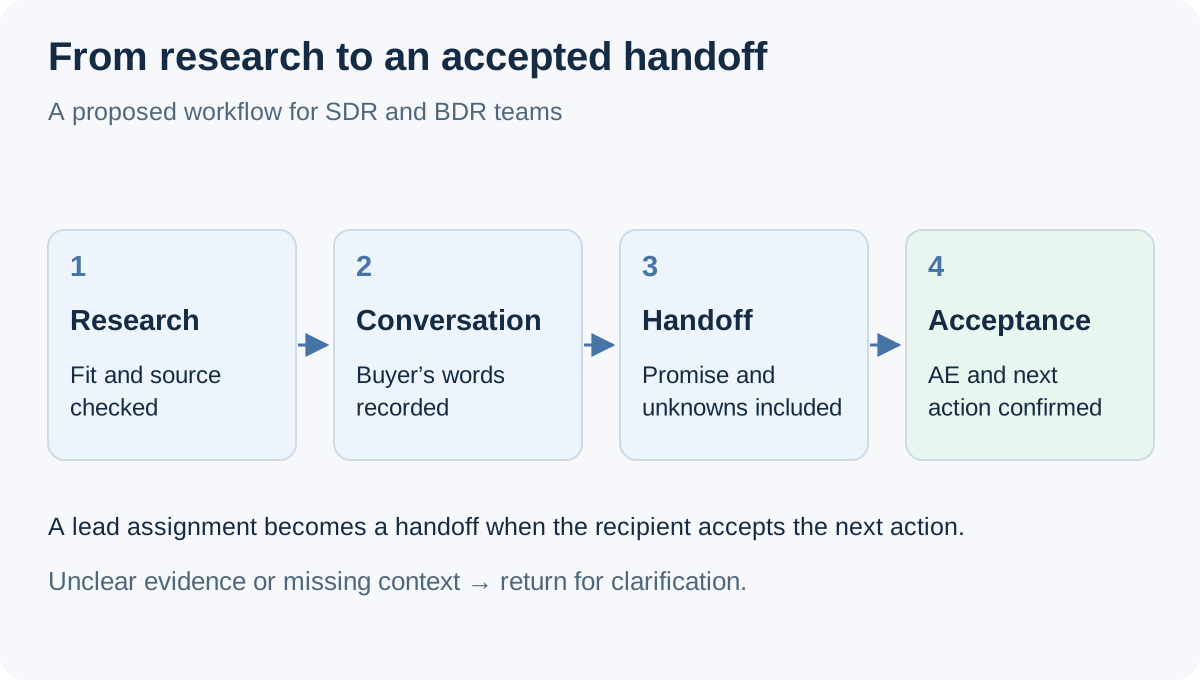
Our lead assignment guide explains the distinction between record ownership, sender access, and the receiving person’s ability to act.
Measure the pilot without confusing activity with outcomes
Use a short pilot to evaluate usability, then continue observing sales outcomes over the appropriate buying cycle. Track prospects reviewed, reasons for rejection, conversations worth continuing, handoffs proposed, and handoffs accepted. Keep unanswered proposals separate from rejected handoffs.
For example, if a fictional team reviews 40 prospects, retains 24, proposes eight handoffs, and receives six AE acceptances, its review retention is 24 ÷ 40 = 60% and its handoff acceptance is 6 ÷ 8 = 75%. Neither percentage is a LinkedIn reply rate or evidence that six sales opportunities will close.
Add the time spent verifying evidence, correcting drafts, and reconstructing missing context. Count team-member access separately from connected LinkedIn senders when comparing costs. A lower subscription price is not helpful if the chosen plan cannot support the people who need to operate it.
Questions SDR and BDR managers ask
Should SDRs and BDRs use different software?
Only when their work differs enough to justify it. Inbound qualification, outbound discovery, and named-account monitoring can require different inputs; the job title does not determine the answer.
Does a positive reply qualify a lead?
It establishes something the buyer actually said. Qualification still depends on fit, the issue discussed, and the next action your team agrees is appropriate.
What should an evaluation prove before adding more senders?
A representative can review evidence, prepare an accurate message, handle a reply, and pass the context to an AE who can continue without reconstructing the conversation.
Evaluate one complete development workflow
Explore Privly for B2B sales teams with one offer and one reviewed audience. Follow a prospect through the full handoff before expanding capacity.
Source note: reviewed November 19, 2026. Role context comes from Salesforce; saved-account monitoring and platform rules come from LinkedIn’s documentation linked above. The qualification exercise, message, handoff, and calculations are original examples. Product guidance follows Privly’s campaign documentation.
 Agency Reporting
LinkedIn Lead Generation Software With Client Reporting
Compare LinkedIn client reporting software using a practical metrics worksheet, permission checks, attribution rules, and an agency reporting example.
November 19, 2026 · Giress Kenn Ideal Customer Profile
LinkedIn Prospecting Software That Starts With Your Company Website
Turn your company website into a reviewed LinkedIn prospecting brief. Use a profile worksheet, exclusions, and sample-lead review before launching outreach.
November 19, 2026 · Giress Kenn Buyer Intent
LinkedIn Intent Monitoring Tools: Compare Scan Frequency and Signal Freshness
Compare LinkedIn intent monitoring with four timestamps, a freshness worksheet, and a worked example. Separate scan cadence from useful buying evidence.
November 19, 2026 · Giress Kenn