

LinkedIn Prospecting Software That Starts With Your Company Website
Published · Giress Kenn
Practical guidance for founders, B2B teams, and small agencies turning buyer signals into reviewed next actions.
Photo by Rodrigo Rodrigues | WOLF Λ R T on Unsplash
Your homepage says you help growing businesses. A prospecting tool turns that into a long list of potential buyers, but the sales team cannot explain why most belong there. Website-based LinkedIn prospecting works best when the website starts a reviewable brief. Here is how to correct the offer, audience, exclusions, and buying context before contacting anyone.
What does website-based LinkedIn prospecting actually do?
The website supplies context about your business: what you sell, the problems you address, and the customers you describe. A prospecting workflow uses a reviewed version of that context to guide audience selection and lead research. It still needs evidence about each potential buyer.
This is different from identifying companies that visit your website. Starting with your company URL does not establish visitor tracking or reveal who is reading your pages. Be precise about the task when comparing tools, because both approaches can appear in searches for website prospecting.
In Privly, website-based setup can propose business-profile details for review. Manual entry is also available. A clear setup result should let you correct an inaccurate business description before it influences discovery. If the site cannot be read or lacks useful detail, supplying accurate context yourself is better than treating an incomplete profile as ready.
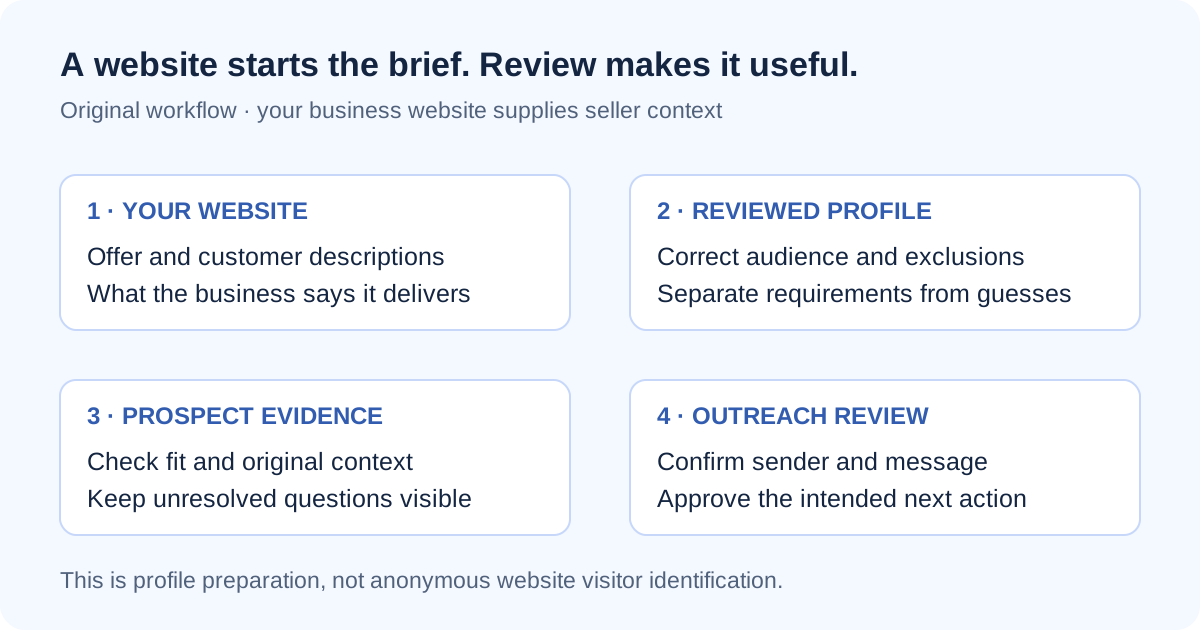
Start with the business profile setup guide. Your website describes your business; it is not itself the conversation source that proves a prospect has a need.
Step 1: choose the offer the profile should describe
Write one plain-language sentence describing the offer you want to prospect for. Include what you deliver, who can use it, and the problem it addresses. Then compare that sentence with your website. A company offering software, consulting, and training may need a narrower campaign brief than its homepage provides.
Look for business-model errors before smaller wording differences. A consultancy that implements another vendor's software should not be presented as the software vendor. A product requiring specialist installation should not be described as instant self-service. Those errors affect both audience selection and the promises in outreach.
Use actual customer and delivery knowledge to resolve ambiguity. Mark claims that need confirmation, including integrations, geographic availability, and customer results. Do not add invented proof because the website is sparse. A new offer can start with manual context while its public positioning develops.
Step 2: turn the generated profile into a qualification brief
Review the proposed profile with someone who knows why customers buy and why some engagements fail. Separate requirements from preferences. A requirement makes delivery unsuitable when absent; a preference helps prioritize otherwise suitable prospects. Keeping those categories distinct prevents a convenient assumption from excluding a useful buyer.
| Review area | Question to answer | Example correction |
|---|---|---|
| Offer | What are we actually selling in this campaign? | Production-planning implementation, not general analytics |
| Company fit | Which organizations can use and buy it? | Manufacturers with recurring production scheduling |
| Relevant role | Who experiences or owns the problem? | Operations or production-planning leaders |
| Required conditions | What must be true for delivery to work? | The prospect has a production process we support |
| Exclusions | Which requests should we decline? | Unrelated spreadsheet training or student research |
| Buying context | What evidence makes a conversation timely? | A stated scheduling or reconciliation problem |
| Unknowns | What still needs a conversation? | Current tools, project timing, authority, and budget |
This is an original review worksheet, not a promised set of software fields. The B2B ideal customer profile template expands the customer-fit questions when your team needs a fuller brief.
Step 3: make exclusions concrete without overrestricting discovery
An exclusion should explain why a prospect is unsuitable. Cannot serve this region is different from rarely sells there. Only supports a particular operating process is different from prefers a certain company size. If the rule cannot be explained to another salesperson, clarify it before using it to reject prospects.
Review exclusions against both a known good customer and an obvious poor fit. If the same rule removes both, it may be too broad. Also check language: buyers may describe the relevant problem without using the category name on your homepage. Keyword similarity alone is a weak reason to keep or reject someone.
For the ongoing editing workflow, read the editable ICP and exclusions guide. Keep a brief note of major targeting changes so later results can be interpreted against the profile that produced them.
Step 4: inspect a small sample before approving outreach
Pick a manageable first sample, such as ten prospects, and record why each belongs or does not belong. Ten is a practical review exercise, not a statistically representative sample or an accuracy benchmark. Include uncertain matches so the review exposes gaps rather than only confirming easy successes.
For each person, answer two separate questions: does the person fit the offer, and what supports contacting them now? A suitable title at a suitable company establishes possible fit. A public discussion of a relevant problem adds context. Neither proves an active buying project, budget, or permission to assume dissatisfaction with an existing supplier.
Open the original context when available. Check whether the person describes their own situation, quotes someone else, promotes their services, or asks for help. A post about production planning can be educational content rather than a request for a vendor. Keep that uncertainty in the qualification note and the message.
Worked example: narrowing a manufacturing consultancy's website
A fictional Chicago consultancy describes analytics, training, and production planning on its website. The first profile says it helps operations teams improve decisions. That is plausible but too broad for a campaign focused on replacing spreadsheet-based scheduling.
The sales owner narrows the offer to planning-process implementation, confirms the operating requirements, and excludes unrelated training requests. One prospect has the right role but has shared only a general productivity article. Another describes repeatedly reconciling schedules between two plants. The second has more relevant context, but the current systems and project scope remain unknown.
The improvement is a clearer reasoning trail from offer to evidence to question. The salesperson can explain why the prospect is relevant while leaving room for the buyer to correct an assumption.
Step 5: review the launch requirements separately
Approving a profile is one decision. Approving a specific audience, sender, and message is another. Before outreach, check the intended workspace and account, inspect the message for unsupported claims, and name the person responsible for replies. Website setup alone does not authorize sending.
If the first matches are poor, classify the problem before rewriting everything. Incorrect business facts require a profile correction. Irrelevant source context requires a qualification review. Missing or stalled results may require a connection or discovery check. Increasing activity before identifying the cause creates more review work without fixing the input.
- Approve the offer and audience with a sales owner.
- Separate mandatory fit requirements from preferences and unknowns.
- Inspect the original context behind a small sample of matches.
- Remove unsupported urgency, budget, and product claims from drafts.
- Confirm sender readiness, campaign approval, and reply ownership.
Questions to answer before choosing website-based prospecting software
Do we need a complete website?
No. Privly also supports manual business-profile entry. You still need an accurate offer, audience, and delivery requirements. A website can reduce initial data entry; it cannot supply facts your business has not established.
Will the tool identify our perfect customers automatically?
Do not assume that outcome. Compare its proposed profile with actual qualification requirements and review individual prospects. Detailed wording is not evidence that the targeting is correct.
What should we measure during evaluation?
Record the time spent correcting the profile, the reasons sample prospects were accepted or rejected, and the message edits required. These observations show implementation effort for your business; they are more useful than setup speed alone.
Use your website as the first draft of a better prospecting brief
Try Privly's free ICP identifier and compare the proposed context with the worksheet above. Correct the assumptions before deciding whether the wider discovery and outreach workflow fits your team.
Sources reviewed November 19, 2026: Privly's current business profile setup documentation and opportunity review guide. The worksheet and manufacturing example are original teaching material; no profile-accuracy or lead-volume benchmark is claimed.
 Agency Reporting
LinkedIn Lead Generation Software With Client Reporting
Compare LinkedIn client reporting software using a practical metrics worksheet, permission checks, attribution rules, and an agency reporting example.
November 19, 2026 · Giress Kenn Buyer Intent
LinkedIn Intent Monitoring Tools: Compare Scan Frequency and Signal Freshness
Compare LinkedIn intent monitoring with four timestamps, a freshness worksheet, and a worked example. Separate scan cadence from useful buying evidence.
November 19, 2026 · Giress Kenn Conversation Management
LinkedIn Prospecting Software With Reply and Conversation Tracking
Evaluate LinkedIn reply tracking with a conversation handoff template, reply handling matrix, permission checks, and follow-up stop tests for sales teams.
November 19, 2026 · Giress Kenn