

LinkedIn Prospecting Software With Reply and Conversation Tracking
Published · Giress Kenn
Practical guidance for founders, B2B teams, and small agencies turning buyer signals into reviewed next actions.
Photo by Amy Hirschi on Unsplash
A prospect replies, “Yes, send it over.” The original salesperson is away, another teammate cannot find the offer, and the next follow-up is still waiting. Reply tracking is useful when it helps the team understand the conversation and take responsibility for what happens next. Here is how to evaluate that complete workflow in LinkedIn prospecting software.
What should LinkedIn reply tracking include?
A useful workflow connects the received reply with the person, prior messages, campaign context, and next responsible teammate. It should also make it possible to confirm that scheduled follow-ups will not continue as if no response arrived. An inbox view is the beginning of that workflow, not its completion.
Evaluate the conversation after the first reply. Ask a teammate who did not write the opening message to explain what the buyer means and what was promised. Send it over only makes sense when the teammate can see the resource offered. Not this quarter needs a different next step from a request for a demonstration.
LinkedIn's Sales Navigator Inbox documentation describes conversations organized by person, with message history and prospect context. Those are useful basics to inspect in any prospecting inbox; team access, ownership, and campaign handling need their own evaluation.
Separate a recorded reply from a qualified opportunity
A reply is an event. Its commercial meaning needs interpretation. A question, objection, referral, refusal, or request to stop can all appear as a response. Counting them together may help measure engagement, but it does not tell a salesperson which conversations belong in the pipeline.
Preserve the buyer's words separately from your conclusion. We are reviewing the process does not mean we have approved budget. Can you explain the integration is a useful question, but it does not confirm technical fit. Record the uncertainty so the next person does not repeat an inference as fact.
| Buyer response | Useful next action | Avoid assuming |
|---|---|---|
| Send the checklist | Deliver the resource already offered | They accepted a sales meeting |
| Does it work with our current tools? | Clarify requirements and verify compatibility | The integration is supported |
| Maybe next quarter | Clarify whether a later check-in is welcome | They want repeated reminders now |
| Talk to my colleague | Clarify the referral and relevant context | The colleague has agreed to outreach |
| Not interested / stop contacting me | Respect the refusal and stop further outreach | A different sequence is an acceptable workaround |
These are suggested operating categories, not a promise that a particular tool creates every label automatically. Agree the definitions with your sales team before using positive replies in a report.
Confirm the follow-up stop and the human next action
Stopping a sequence and answering a conversation are separate responsibilities. A detected reply should stop inappropriate later sequence messages. A person still needs to review the context, respond where appropriate, and respect any refusal. Automatic stopping does not establish that the handoff is complete.
Privly records matched replies with conversation context and uses detected replies to stop affected campaign follow-ups. Check the actual thread and relevant campaign during evaluation. Matching, connection health, and sender scope matter; do not assume every message to every account is detected instantly or that one reply stops unrelated outreach everywhere.
The stop-on-reply guide explains the distinction between a reply event and later sequence behavior. If the state is unclear, pause affected outreach while you investigate instead of sending another automated nudge.
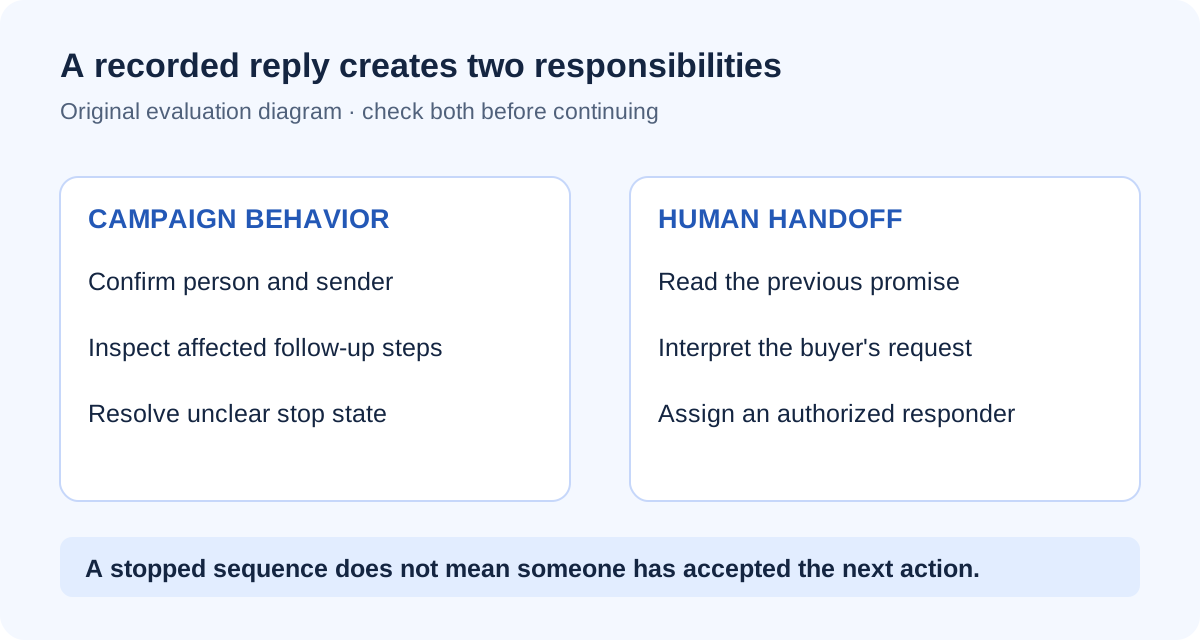
- Confirm the incoming reply belongs to the intended person and sender.
- Read the previous offer and any earlier commitments.
- Inspect the affected campaign's remaining steps and stop state.
- Choose the appropriate human response or record that no further contact is wanted.
- Assign the next action to one authorized person.
Make conversation ownership an explicit handoff
An owner field is useful, but ownership works only when the receiving teammate accepts the next action and can access the necessary context. Agree a backup for absences. Check that backup's access before it is needed, especially when the conversation belongs to another person's LinkedIn sender.
In Privly, workspace membership does not give every teammate universal conversation access or permission to send through another member's account. Evaluate the actual role, permitted conversations, and sender arrangement. A lead assignment and the authority to answer a message are different questions.
Use the lead assignment guide to organize responsibility, and the workspace access guide to review permissions. Keep your coverage agreement separate from the role's name.
Worked example: a compatibility question goes to the right owner
A fictional SaaS team's SDR contacts an operations director about a publicly discussed reporting problem. The director replies: Can you show how this works with our current approval process? The SDR reads the preceding message and checks which workflow was mentioned before asking an account executive to help.
The handoff includes the actual question, the existing promise to share a practical example, and the fact that compatibility is unverified. The account executive accepts the next action and identifies which requirements need clarification. The team confirms that the relevant automated follow-ups have stopped and uses an authorized sender for the response.
The example makes no assumption about approved budget, a booked meeting, or automatic routing. It illustrates a complete handoff: understand, verify, accept ownership, then respond. The reply becomes useful sales evidence as the buyer clarifies the situation.
Define what should reach the CRM
Keep opportunity stages and forecasts in your team's chosen sales system. Decide what must accompany the contact: a summary of the buyer's stated need, an agreed next step, an owner, and a link to permitted context. Some teams need message history; others need a concise, reviewed summary. Make that requirement explicit before selecting an integration.
Privly's contact export workflow is narrower than continuous synchronization of all messages and deal stages. Ask how records are matched, which fields transfer, whether existing values are changed, and how a failed export is shown. Include manual summarization in your operating plan when the integration does not provide it.
The CRM and webhook guide provides a detailed evaluation checklist. A successful contact transfer should not be treated as proof that the receiving salesperson can see the complete conversation.
Evaluate one complete reply-to-handoff journey
Use an agreed internal evaluation or vendor demonstration to inspect the workflow before expanding it across customers. Start from the message that created the reply, rather than opening only a pre-populated inbox. Include an interested question, a refusal, an unavailable owner, and a teammate with restricted access.
For each case, check what appears, who can read and answer it, which follow-ups stop, and what reaches the CRM. Record gaps with an owner and a practical workaround. This helps distinguish missing permissions from missing data and avoids buying extra seats to solve an access arrangement the product does not support.
Measure handoff effort during the pilot: time spent locating context, correcting summaries, and confirming ownership. Faster replies are useful only when they are accurate and respect the buyer's request. Do not use an inbox feature count as a substitute for a workflow your team can complete.
Common questions about LinkedIn conversation tracking
Does reply tracking replace a CRM?
No. Conversation history helps people respond; CRM opportunity management supports deal stages, ownership, and forecasting. Define the information exchange your team needs rather than assuming either system performs both jobs.
Can every teammate answer every conversation?
Do not assume so. Access and sending authority depend on workspace permissions and the sender arrangement. Check the actual role with the actual conversation, including the intended backup owner.
Is no reply evidence that a prospect is not interested?
No. It means no reply is recorded in the workflow you inspected. Avoid inventing a reason. Check for conversation or connection issues, follow the agreed cadence, and pause instead of escalating repeated messages indefinitely.
Choose the workflow your next teammate can understand
Start with Privly's leads and messages guide, then use the handoff template to evaluate one complete conversation with your team. The useful outcome is a clear next action with the right context and authority.
Sources reviewed November 19, 2026: LinkedIn's Sales Navigator Inbox documentation, Privly's current conversation and campaign behavior, and workspace access guidance. The reply matrix, handoff template, and SaaS scenario are original illustrative material.
 Agency Reporting
LinkedIn Lead Generation Software With Client Reporting
Compare LinkedIn client reporting software using a practical metrics worksheet, permission checks, attribution rules, and an agency reporting example.
November 19, 2026 · Giress Kenn Ideal Customer Profile
LinkedIn Prospecting Software That Starts With Your Company Website
Turn your company website into a reviewed LinkedIn prospecting brief. Use a profile worksheet, exclusions, and sample-lead review before launching outreach.
November 19, 2026 · Giress Kenn Buyer Intent
LinkedIn Intent Monitoring Tools: Compare Scan Frequency and Signal Freshness
Compare LinkedIn intent monitoring with four timestamps, a freshness worksheet, and a worked example. Separate scan cadence from useful buying evidence.
November 19, 2026 · Giress Kenn