

How to Set Up a B2B LinkedIn Outbound Campaign
Published · Zyaam Ali
Practical guidance for founders, B2B teams, and small agencies turning buyer signals into reviewed next actions.
You have a prospect list, a message draft, and someone ready to send. But why does each person belong in this campaign, and what happens when they reply? A B2B LinkedIn outbound campaign needs those answers before launch. This guide takes one business from a clear audience brief to a reviewed sequence, a small pilot, and a useful results sheet—with a campaign worksheet you can use in a spreadsheet or your existing sales tool.
What is a B2B LinkedIn outbound campaign?
A B2B LinkedIn outbound campaign is a planned set of conversations initiated by your team with selected business prospects. It connects one audience and offer to a sender, message sequence, review process, and reply owner. Its purpose is to learn whether a relevant conversation can move toward a qualified next step.
Here, campaign means direct prospect outreach. LinkedIn Campaign Manager is the separate advertising product for paid campaigns. For direct outreach, you can begin with a research sheet and manual messages; you do not need an advertising budget to use this worksheet.
In Gartner’s June 2025 buyer survey, 73% of 632 B2B buyers surveyed in August–September 2024 reported avoiding suppliers that send irrelevant outreach. That is a buyer-attitude finding. Our practical response is to make audience relevance a launch requirement.
Step 1: Fill in the campaign brief
Start with one problem your offer can solve and one group responsible for it. ‘Book more demos’ is a business wish; it does not explain whom to contact. A usable goal describes the conversation you want: find support leaders evaluating how to route incoming customer requests, then understand their requirements.
The worked example below uses Queuewell, a fictional support-workflow SaaS business. Its campaign offers a ticket-triage worksheet to support managers at B2B software companies. The worksheet, company, and campaign decisions are examples you can adapt; they are not customer results.
| Field | Example decision | What to confirm for your campaign |
|---|---|---|
| Audience | Support managers at B2B SaaS companies with 20–100 employees and a support team | Company fit and who owns the workflow |
| Problem | Incoming requests lack a clear first owner | A stated issue or a question worth researching |
| Offer | A ticket-triage worksheet covering queue, owner, and escalation | The resource exists and matches the stated need |
| Exclusions | Solo operators, outsourced-only support, customers, open deals, and contact refusals | Current records and requirements you cannot serve |
| Sender | A named Queuewell specialist who can answer routing questions | An accurate profile and permission to use the sender |
| First next step | Permission to share the relevant worksheet | One clear ask the recipient can answer |
| Reply owner | The same specialist, with a named backup | Who handles questions and agreed follow-ups |
| Pilot record | One audience, one message version, and a fixed review date | How each stage and outcome will be counted |
If the audience is still vague, use the B2B ideal customer profile template before building the list. Keep a dated brief so later edits do not quietly change what the pilot was testing.
Step 2: Review the audience before writing messages
For each person, record company fit, role fit, the source and date of relevant evidence, previous contact, and anything still unknown. Read the original context. A search snippet can omit a resolved problem, a different buyer, or a request aimed at an audience you cannot serve.
Separate being a suitable customer from showing an active need. A support manager asking for routing-tool recommendations may merit a specific response. A support manager who only matches your target role needs a more exploratory approach. A job change alone does not establish that they are buying software.
| Observed situation | Decision | Reason |
|---|---|---|
| Fits the brief and asks for routing-tool recommendations | Prepare a relevant message for review | A matching need is visible; confirm requirements |
| Fits the brief but no need is stated | Research or use an honest exploratory message | Role fit does not establish purchase intent |
| Describes the problem but requires an unsupported integration | Exclude from this offer | Strong interest cannot repair a failed requirement |
| Already in an active conversation with your team | Coordinate with the existing owner | Avoid restarting a pitch from another sender |
| Asks not to be contacted | Stop and record the refusal | A stop instruction overrides campaign interest |
For a repeatable review rubric, use the B2B lead scoring guide. Keep failed requirements visible instead of hiding them inside a total score.
Step 3: Build a sequence with clear stop conditions
Choose the message channel before drafting. A connection note accompanies an invitation. A post-connection message continues the conversation after acceptance. InMail has its own availability and conventions. Do not paste one long pitch into all three or count them as the same interaction.
For an initial manual campaign, use a short path: a relevant invitation where appropriate, a first message after acceptance, and one useful follow-up if unanswered. Waiting several business days before that follow-up is a starting choice, not a proven best interval. Adjust to the person’s context and stop after a refusal or when the test sequence is complete.
| Stage | Purpose | Continue only when |
|---|---|---|
| Invitation | Explain the professional reason to connect | Fit is reviewed and the invitation is appropriate |
| First message | Connect the stated problem to a useful resource | The connection is accepted and context still applies |
| One follow-up | Add one practical detail from that resource | There is no reply, refusal, or existing owner handling it |
| Reply | Answer the question or deliver what was requested | A person owns the conversation; pending nudges stop |
| No response | Close this test sequence and retain the history | Any later contact has a fresh, appropriate reason |
This example requires an actual post about ticket assignment and an existing worksheet. For more first-message scenarios, use the personalized LinkedIn message examples.
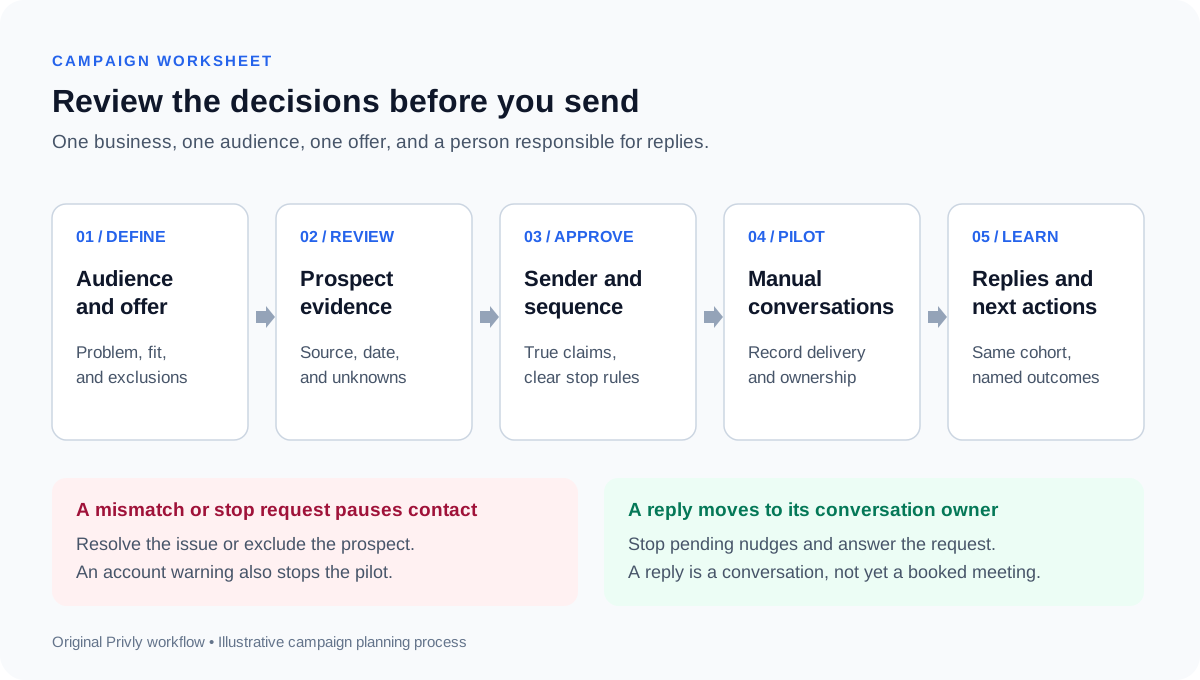
Step 4: Make the launch decision explicit
Review the actual audience alongside the actual message version. Check that every personalized reference is true, each promised resource is ready, and the sender can answer the likely questions. A correct sequence aimed at the wrong people still produces irrelevant outreach.
Keep the audience, sender, offer, and wording together in the approved record. If a material part changes, return to review. A spelling correction and a new claim about an integration are different changes; the second can alter whom you can serve and what the buyer expects.
- Audience: each prospect meets the brief; existing conversations and refusals are checked.
- Evidence: the original source is current and supports the reference being made.
- Sender: the profile, workspace access, and intended account are correct.
- Sequence: the invitation, first message, follow-up, and stop conditions are reviewed.
- Offer: the resource and any product claims match what you can deliver today.
- Ownership: someone can handle replies and pause the campaign if a problem appears.
- Measurement: the cohort, message version, outcome definitions, and review date are recorded.
Choose delivery methods with LinkedIn’s platform rules in view. LinkedIn prohibits unauthorized automation and scraping, and accounts can be restricted. A low volume or a software safety setting does not establish permission. Use manual delivery for this starting pilot and stop if the account raises a warning.
Step 5: Run a small pilot and give replies an owner
Select a batch small enough to review every person and handle every reply. Keep the same audience definition and first-message version during the batch. Record missed sends and unresolved invitations separately so they do not become invisible losses.
When someone answers, read what they need before moving toward a meeting. Send a requested resource, answer a relevant question, and ask about timing only when it helps. Interest in a worksheet is a conversation; a qualified call also needs an appropriate problem, a suitable person, and an agreed next step.
A rejection ends the sales sequence. If the prospect suggests a later date, agree on that date and owner. If nobody answers by the end of the planned sequence, close that attempt rather than extending it simply because the campaign needs more activity.
Review the campaign using separate outcomes
Record unique prospects, invitations sent, acceptances, people messaged, any replies, positive replies, and qualified meetings separately. Define a positive reply before launch: for example, a request for the offered resource or an answer that opens a relevant discussion. A request to stop is a reply, but not a positive one.
The fictional example below observes one cohort for 14 days after its invitations. Each of the eight accepted prospects receives one first message. Counts reflect only what happened inside that window; unresolved invitations remain visible and the rates may change later.
| Outcome | Example count | Calculation |
|---|---|---|
| Invitations accepted | 8 of 20 invitations sent | 8 ÷ 20 = 40% |
| People who replied | 3 of 8 people messaged | 3 ÷ 8 = 37.5% |
| Positive replies | 2 of 8 people messaged | 2 ÷ 8 = 25% |
| Qualified meetings booked | 1 of 20 people invited | 1 ÷ 20 = 5% |
| Invitations unresolved at review | 12 of 20 invitations | Retain as pending at the cutoff |
For external context, Expandi’s May 2026 platform analysis reported 28.5% acceptance across 13,218,869 connection requests from 13,302 active accounts, collected May 2025–April 2026. It describes that platform’s senders, not a target for this small fictional cohort. Its outbound-message category also includes email and InMail, so that rate is not a pure LinkedIn DM comparison.
Use the pilot to find problems before choosing a winner. Wrong-role replies suggest a targeting issue; repeated questions about your offer suggest missing clarity. Change one meaningful part for the next comparable batch and keep the observation window consistent. A handful of replies cannot establish a reliable conversion forecast.
Common LinkedIn campaign setup mistakes
Mixing several industries, roles, and offers makes it hard to explain which part helped or hurt. Begin with a coherent audience and one offer. Keep promising adjacent segments for a separate test instead of broadening the brief halfway through.
Another mistake is reviewing generic copy while skipping personalized messages. A template can be sound while an individual version invents context. Read the evidence beside the message. Also check reply ownership before launch: starting more conversations than the team can handle creates a service problem even when targeting is good.
Finally, avoid reporting every acceptance as a lead or every positive reply as a meeting. Keep the stages visible. The pilot’s value is the information it produces about a particular audience, offer, and workflow.
Questions before your first LinkedIn outbound campaign
Do I need paid LinkedIn ads?
This guide covers direct outreach, which can start with manually researched prospects and appropriate messages. Paid advertising is a separate campaign choice. Check which messaging options your account actually provides before designing the sequence.
How many prospects should the first campaign include?
Choose a batch you can fully research and support. The 20-invitation example illustrates reporting, not a sending limit or sample-size recommendation. Account conditions and platform requirements still apply.
When should I change the campaign?
Pause immediately for incorrect context, an unsupported promise, an account warning, or missed stop requests. For performance changes, wait until the agreed review and examine comparable outcomes before changing the audience or wording.
How does this work in Privly?
Privly lets you select leads or a contact list, set the campaign goal and call to action, and review the sequence. Manual mode keeps delivery decisions with your team. The campaign setup help guide explains the available sending modes and how pausing and replies affect follow-ups.
Put the brief into practice
Finish one audience brief, review the prospects, and prepare a sequence whose offer you can deliver. Then assign reply ownership and a review date. Those decisions make the first campaign useful even before you have a performance benchmark.
Start with your website in Privly to build your business profile, review relevant opportunities, and prepare your first campaign.
Research reviewed October 9, 2026: Gartner’s buyer survey, Expandi’s platform analysis and methodology, and LinkedIn’s software policy. Queuewell, the worksheet, messages, workflow, and pilot calculations are original examples.
 LinkedIn Messages
LinkedIn Connection Request Messages: What to Write and When
Write a clear LinkedIn connection request message with six original note examples, a decision table, current platform guidance, and a pre-send checklist.
October 13, 2026 · Giress Kenn LinkedIn Messages
LinkedIn Cold Outreach Messages: Personalized Templates and Examples
Write a relevant LinkedIn cold outreach message with six original templates, a prospect-evidence worksheet, and a practical personalization checklist.
October 9, 2026 · Giress Kenn Demand Generation
Managing Multi-Client LinkedIn Outreach: A Demand Gen Agency Playbook
Run client LinkedIn campaigns with a reusable campaign record, prospect review, approval checklist, reply routing, CSV handoff, and weekly reporting routine.
October 5, 2026 · Zyaam Ali