

LinkedIn Cold Outreach Messages: Personalized Templates and Examples
Published · Giress Kenn
Practical guidance for founders, B2B teams, and small agencies turning buyer signals into reviewed next actions.
Photo by Alicia Christin Gerald on Unsplash
Changing a first name does not make a cold message personal. The reader still needs to understand why you chose them and why answering would be useful. These LinkedIn cold outreach messages show how to turn a real post, requirement, or company initiative into a short first conversation. You will get six original examples, the evidence each one needs, and a personalized LinkedIn message template you can adapt without inventing a buying problem.
What makes a LinkedIn cold outreach message relevant?
A LinkedIn cold outreach message starts a conversation with someone who has not asked to hear from your business. A relevant message explains the connection between their work and your offer using facts you can verify. Personalization changes the reason for contacting the person, not just the name at the top.
A connection note belongs to an invitation. A direct message after acceptance is a fuller conversation. InMail is another channel with separate access and formatting. The examples here focus on first sales messages after connection, with an InMail adaptation where useful. Accepting an invitation does not establish buying intent.
In Gartner’s June 2025 release, 73% of 632 B2B buyers surveyed in August–September 2024 reported avoiding vendors whose outreach was irrelevant. The survey measures buyer attitudes, not the reply rate of a template. It gives us a reason to review whether the message addresses the recipient’s situation.
LinkedIn’s sales InMail guidance recommends brief messages, concrete context, and a single ask. Its suggested 50–75-word range concerns InMail. Use it as an editing prompt for that channel rather than a performance rule for connection notes or direct messages.
Build the message from evidence, relevance, and one question
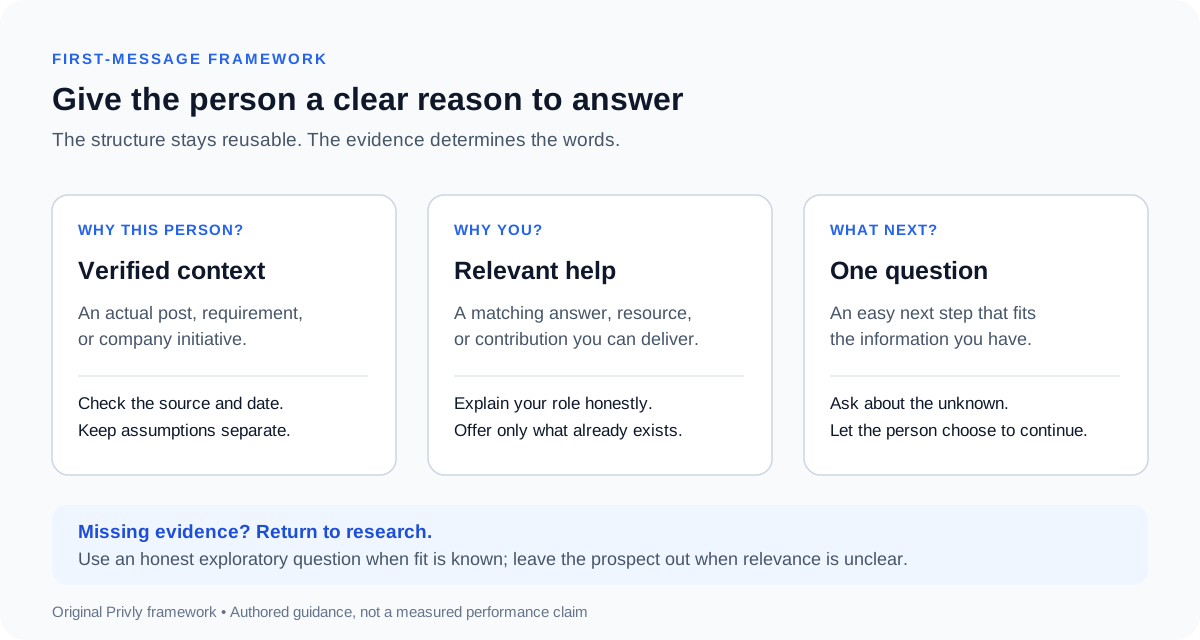
Use three parts: name the verified context, explain what you can usefully contribute, and ask one small question. Identify your business naturally so the recipient understands the commercial context. You do not need a long introduction, a feature list, and a calendar link to start.
Before drafting, save the original source, its date, the relevant observation, and what remains unknown. A person comparing tools has a different situation from someone announcing a product launch. If your research cannot support a problem statement, ask an honest question instead of writing as though the problem is confirmed.
| Field | Recorded context | How it changes the message |
|---|---|---|
| Original source | A prospect’s current public request for CRM recommendations | Read the requirements before mentioning the post |
| Verified fact | They need clearer account ownership | Open with ownership, rather than generic growth |
| Your relevant contribution | An existing ownership-rule comparison sheet | Offer the matching section you can actually send |
| Unconfirmed point | Whether they require territory-based assignment | Ask about that requirement without assuming it |
| Stop check | No refusal or teammate already handling the conversation | Coordinate before beginning a new sequence |
Use the B2B buying signals guide to judge what the evidence supports. A relevant company event can justify research; it does not automatically support a claim that the person needs your product.
Six LinkedIn cold outreach templates with context
Choose the example that matches the information you actually have. These are fictional scenarios and original messages. Replace the context, resource, and sender identity with your own verified facts. Each offered resource must already exist, and any stated capability must match what your business provides.
1. The prospect asks for tool recommendations
Use when the person publicly names a relevant requirement and is still evaluating options. Read the full discussion before replying; the question may already have been answered or the decision made.
The question helps clarify the stated requirement. It avoids declaring that your product is the perfect choice before you understand the setup. If your solution cannot meet a mandatory requirement, explain that rather than steering past it.
2. The prospect describes a specific workflow problem
Use when an original post or article describes a problem connected to your work. Refer to the actual problem without upgrading it into an invented budget, deadline, or purchase decision.
The resource follows directly from the observed issue. Asking permission to share it creates a manageable next step. Do not claim it will repair their CRM without learning where the mismatch comes from.
3. A company initiative gives you a question to ask
Use when the company has announced a real initiative and the recipient’s responsibilities connect to it. Separate the announced change from your hypothesis about how it affects their work.
The API announcement is the fact; the documentation approach is unknown. This message asks about the unknown rather than claiming the launch has created a support crisis. It suits a sender who can contribute to that documentation work.
4. An existing conversation points to another owner
Use only when the named person actually suggested the contact and agreed that you may mention them. A mutual connection visible on a profile is not an introduction or an endorsement.
The introduction explains why this person is being contacted and leaves them control over the next step. Keep the summary limited to information you have permission to share; do not forward private conversation details as personalization.
5. The person fits your audience, but intent is unconfirmed
Use when you can verify a relevant business workflow but have no stated buying need. Check that the person’s responsibility is appropriate. Be open about what you do and ask whether the topic matters before offering a solution.
The service offering is verified; a reporting problem is not. An answer may reveal that the workflow already works well or belongs to someone else. Accept that information instead of forcing a pitch about an unconfirmed pain point.
6. You can answer a narrow technical requirement
Use when a prospect names a technical or operational condition your business can credibly address. Prepare a useful answer before sending; asking to share it should not become a hidden requirement to book a demo.
This focuses on one requirement and a resource the sender can deliver. If the person asks how your own product handles it, answer from current documentation. Do not replace a missing capability with an unsupported security promise.
Edit a generic cold message into a specific one
Read the draft as the recipient. Can you see what the sender noticed, why it connects to their business, and what they want you to do? If those answers require guessing, remove the broad claims and return to the evidence worksheet.
| Generic line | Contextual alternative | Required support |
|---|---|---|
| I was impressed by your company. | Your product announcement included a new developer API. | Read the original announcement |
| You must be struggling with documentation. | Are you planning a separate developer onboarding guide? | The initiative is known; the approach remains a question |
| We help teams save hours every week. | I can share a checklist for reviewing the onboarding steps. | An existing checklist you can deliver |
| Can we book 30 minutes tomorrow? | Would that checklist help with your review? | The smaller ask fits the current conversation |
- Read the cited post or page and confirm its date and current context.
- Check that the recipient owns or influences the work you mention.
- Separate stated facts from questions about an unconfirmed need.
- Keep your sender identity and commercial role clear.
- Promise only resources, capabilities, or proof you can supply.
- Keep one main ask and remove unrelated biography or feature detail.
- Check previous replies, refusals, and teammate ownership before sending.
For InMail, add a short subject that describes the same topic, such as ‘API onboarding guide.’ Keep the body grounded in the same evidence. For a connection note, shorten the reason to connect and save the fuller offer for the appropriate conversation.
Follow up by adding value, then respect the answer
For a first manual test, one follow-up after several business days can add a useful detail to the original offer. This is a starting cadence, not a universal timing rule. The detail should stand on its own even if the person never requests the resource.
If they ask for the checklist, send it before suggesting a meeting. If they raise a requirement, answer it directly. If they decline, stop. A ‘later’ response calls for an agreed reminder, and silence after the planned sequence calls for closing that attempt.
Keep the messages inside a workflow with reply ownership and stop conditions. The B2B LinkedIn campaign setup guide provides that worksheet; the LinkedIn outreach strategy guide explains how to separate reply, positive-reply, and meeting outcomes.
Questions about personalized LinkedIn messages
What is the best LinkedIn cold outreach message?
Choose the message whose reason, offer, and question fit the evidence you have. An evaluation question needs different wording from exploratory outreach. No example here has a measured reply-rate guarantee; assess your own comparable conversations.
How long should a first message be?
Keep enough detail to explain the reason and ask without making the recipient read a brochure. LinkedIn’s 50–75-word suggestion is InMail guidance. For direct messages, use the shortest draft that preserves the necessary context; respect the limits shown for your actual channel.
Can I use AI to personalize messages?
Give it the verified observation, source context, offer, and unanswered question. Review the result against those facts. Remove invented familiarity, claims about unstated problems, and promises your business cannot support. A fluent draft still needs a person to review it.
Should I put a booking link in the first message?
Let the request determine the next step. If the person asked for a demo or call, a booking option can be relevant. If you are offering a worksheet or asking about a requirement, start there and propose a call when the conversation supports it.
What if I cannot find a buying signal?
Verify customer and role fit first, then use an honest exploratory question where appropriate. Do not turn a funding announcement, job title, or like into a statement that the prospect needs your product. If you cannot establish relevance, leave the person out of this campaign.
Prepare the next message from real context
Choose one suitable prospect, record the evidence, and write one message that connects it to something useful. Check every claim and assign an owner for the reply. A reusable structure helps you work consistently; the person’s actual situation determines the words.
Start with your website in Privly to review your business profile, qualify relevant opportunities, and prepare messages for review.
Research reviewed October 9, 2026: Gartner’s buyer survey and LinkedIn’s sales InMail guidance. The six scenarios, messages, worksheet, and diagram are original examples. The word-length suggestion is platform guidance, not a tested outcome for these messages.
 LinkedIn Messages
LinkedIn Connection Request Messages: What to Write and When
Write a clear LinkedIn connection request message with six original note examples, a decision table, current platform guidance, and a pre-send checklist.
October 13, 2026 · Giress Kenn LinkedIn Outreach
How to Set Up a B2B LinkedIn Outbound Campaign
Set up a B2B LinkedIn outbound campaign with an audience worksheet, prospect review, message sequence, launch checklist, and clearly defined pilot results.
October 9, 2026 · Zyaam Ali Demand Generation
Managing Multi-Client LinkedIn Outreach: A Demand Gen Agency Playbook
Run client LinkedIn campaigns with a reusable campaign record, prospect review, approval checklist, reply routing, CSV handoff, and weekly reporting routine.
October 5, 2026 · Zyaam Ali