
LinkedIn Connection Request Messages: What to Write and When
Published · Giress Kenn
Practical guidance for founders, B2B teams, and small agencies turning buyer signals into reviewed next actions.
Photo by Vitaly Gariev on Unsplash
You have found someone relevant on LinkedIn, but the invitation box leaves you wondering what to say. A useful connection request message gives them a reason to recognize you and understand why connecting makes sense. This guide helps B2B founders, sales teams, and agencies choose when to invite, write a short note from real context, and handle the next step without treating an accepted request as a sales opportunity.
What is a LinkedIn connection request message?
It is the optional note attached to an invitation to connect. Its job is to explain the relationship or shared professional context. A fuller sales message, resource offer, or meeting discussion belongs to a separate conversation. Start by helping the reader understand who you are and why you chose them.
A good note can be simple: a greeting, one specific point of context, and a reason to stay connected. You do not need to fit your company story into the invitation. Your profile should make your role and business clear when the recipient looks you up.
The distinction matters when measuring results. Expandi’s May 2026 report recorded 28.5% acceptance across 13,218,869 connection requests from 13,302 active accounts between May 2025 and April 2026. Acceptance means the invitation was accepted. It does not measure interest in an offer, and the report does not establish that adding a note causes more acceptances.
When should you send a connection request?
Start with the relationship, then the wording. Meeting at an event, discussing a post, or receiving an agreed introduction gives you context the other person can recognize. A matching job title alone gives you less to work with. Decide whether connecting is the appropriate action before drafting a note.
LinkedIn’s invitation guidance recommends connecting with people you know and trust, and using InMail or groups to network with people you do not know. If you only want to read someone’s updates, consider following them. If they publicly ask for recommendations, answer in the channel they requested before asking them to connect.
| Situation | Useful next action | What the note can explain |
|---|---|---|
| You spoke at an event | Invite while the conversation is fresh | Where you met and the topic you discussed |
| You exchanged substantive comments | Invite if continuing the relationship makes sense | The particular exchange and your shared work |
| A contact agreed to introduce you | Use the agreed introduction first | Who introduced you, with their permission |
| You want to learn from their content | Follow and read before requesting a connection | Do not invent a conversation you have not had |
| Their title matches your target market | Research relevance; consider an appropriate message channel | A title is insufficient evidence of a relationship or need |
| They declined or asked not to be contacted | Stop the approach | Do not try another invitation wording |
For commercial outreach, separate relevance from purchase intent. The B2B buying signals guide explains what a public post or company event can support. A conversation about onboarding can justify discussing onboarding; it does not prove the person is shopping for your software.
Write the note in three short parts
Use a greeting, recognizable context, and a clear reason to connect. Name one detail from the actual conversation, introduction, or exchange. Then explain your connection to the topic in ordinary language. If the context is weak, more polished wording will not fix it.
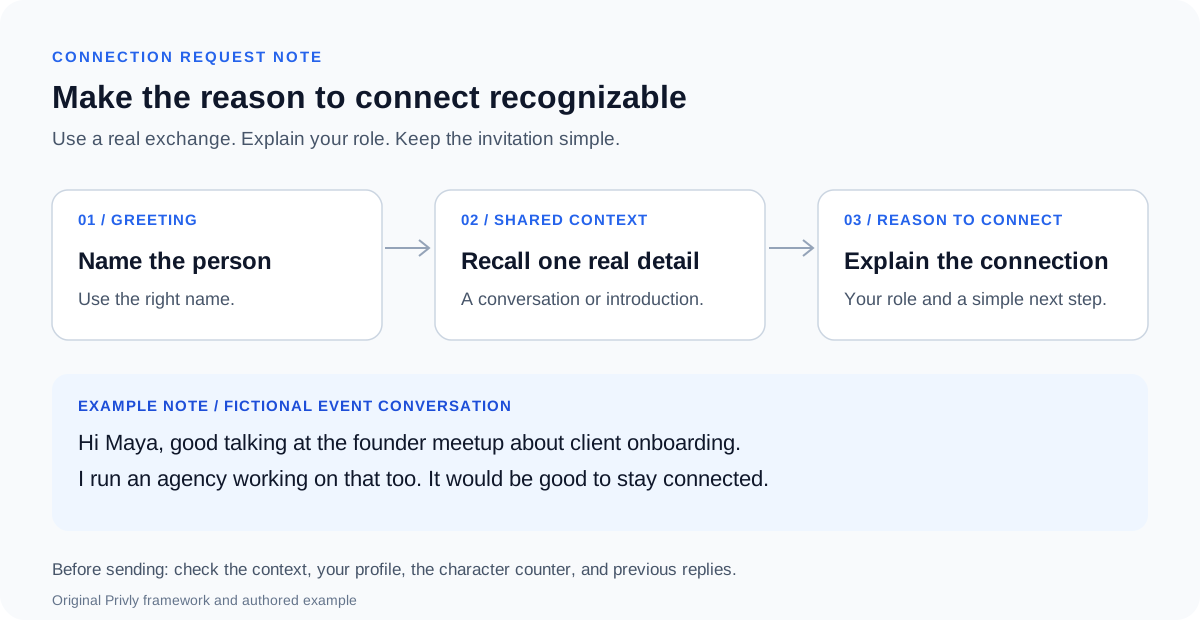
Read the draft aloud. Remove praise that says nothing, a feature list, a booking link, and any claim that assumes a problem the recipient has never stated. Keep your commercial role honest. Someone should be able to understand the invitation without decoding a sales slogan.
Check the character limit and your note allowance
LinkedIn’s personalized-invitation help page currently lists 200 characters per note and three personalized invitations per month. Its invitation-limit page lists five monthly notes for Basic accounts. Follow the character counter and allowance displayed in your own account. Premium removes the monthly personalized-note allowance, but invitation limits still apply.
Draft within 200 characters as a practical starting point. After replacing names, event titles, or company details, check the actual counter before sending. If you cannot add a note, decide whether the invitation still makes sense; an exhausted allowance is not a reason to contact a less relevant person.
On desktop, LinkedIn documents opening the person’s profile, choosing Connect, then Add a note. On mobile, use the profile’s More menu and Personalize Invite. Review the text before sending rather than tapping a quick invitation action.
Six LinkedIn connection request message examples
Choose the example that matches a real relationship or exchange. The names and situations below are fictional. Replace the context, role, and topic with facts from your own experience, then shorten the finished note to fit the counter in LinkedIn.
1. After meeting at an event
Use this when you actually spoke. The event and topic help the person place you. Attending the same large conference is different from meeting; do not imply a conversation simply because both names appear on an attendee list.
2. After a useful comment exchange
The note continues an exchange rather than manufacturing one. Mention the actual topic. A like or profile view alone does not support ‘thanks for discussing.’ A useful public answer can come before the invitation.
3. Following an agreed introduction
Use the name only when the introduction happened and the contact agreed to it. Sharing a mutual connection does not mean that person referred you, endorsed your business, or gave permission to use their name in a pitch.
4. Reconnecting with a former colleague
Remind them of the shared project and say what you do now. Keep confidential client details out of the note. Reconnecting does not entitle you to a referral or meeting; let the person decide whether to continue.
5. After working together in a professional group
Name a conversation you participated in. Group membership alone is not a relationship. The reason to connect here is continuing a professional exchange, so the next message should respect that context.
6. When someone asks you to connect
Their invitation makes the next step clear. Recall the subject rather than repeating a pitch. If they already asked for a resource, deliver it through the agreed channel; do not make connection acceptance an unnecessary condition.
Turn a generic invitation into a clear one
Suppose you met an agency founder and talked about onboarding. You could write a long introduction about your company, but the reader needs a reminder of the exchange. Edit around that job.
| Remove or revise | Use instead | Why it helps |
|---|---|---|
| Your impressive profile caught my eye | We spoke at the founder meetup | Gives recognizable context |
| I know you need better onboarding | We discussed client onboarding | Keeps the statement within the evidence |
| Our platform transforms agency growth | I run an agency working on that too | Explains the sender’s relevant role |
| Book a demo using this link | It would be good to stay connected | Keeps the invitation focused on connecting |
Keep a repeatable structure, but write the context individually. If the same sentence would fit every person in your list, it probably says too little about why this connection matters.
Before sending: check the person, context, and next step
Read the finished note from the recipient’s perspective. They should recognize the context, understand your role, and know what you are asking. Review the previous conversation so a teammate does not begin the same approach again.
- Confirm you have the right person and current role.
- Use only a conversation, introduction, or shared detail you can verify.
- Check that your profile explains who you are and what your business does.
- Remove invented familiarity, assumed buying needs, and unearned endorsements.
- Check the character counter after filling in the real details.
- Respect previous refusals, contact preferences, and any current invitation restriction.
- Keep the first next step appropriate to the reason you gave for connecting.
Common mistakes are pitching before establishing context, asking for a meeting inside the note, and using a shared contact’s name as though they referred you. Another is treating a well-written note as a substitute for knowing why the relationship should exist.
After acceptance: continue the conversation you started
If you promised to stay in touch about a particular topic, continue with that topic. If they requested a resource, send it. If the connection was a professional exchange, do not immediately replace it with a generic sales pitch. Acceptance alone does not show a need, budget, or willingness to meet.
For a relevant commercial conversation, the LinkedIn cold outreach message guide explains how to make a useful offer and ask one answerable question. The LinkedIn outreach strategy guide covers follow-ups and reply measurement.
| Measure | Fictional records | What it tells you |
|---|---|---|
| Requests sent | 40 invitations in one recorded group | The denominator for acceptance |
| Accepted by the review date | 12 of those 40: 30% | Connections made, not sales interest |
| Positive replies | 3 people expressed relevant interest | Review the actual replies before qualifying them |
| Meetings booked | 1 agreed meeting | A separate next step with its own record |
Choose a review interval before starting and compare invitations of the same age. Record late acceptances rather than silently changing the group. If testing notes against no notes, keep the audience, relationship context, sender, and review interval comparable. A small difference may reflect those factors rather than wording.
Questions about LinkedIn connection request messages
Should every request include a note?
Use a note when it adds context the recipient needs. Someone who already recognizes you may understand an invitation without one. For someone who does not, first consider whether connecting is appropriate. Neither a blank request nor a generic note fixes missing relevance.
Is 200 or 300 characters the right limit?
Use the counter in your invitation composer. LinkedIn’s current note guidance lists 200 characters. Draft short enough to leave room for the real name and context rather than relying on a limit repeated in an older template guide.
When should I send the invitation?
After the relevant exchange, while the person can still recognize it. That is a practical timing choice, not a proven best hour. If they requested a later contact date, respect it. A person’s local time and situation matter more than a generic scheduling rule.
What if the invitation stays pending?
Leave room for no response and avoid repeatedly approaching the person. LinkedIn says that withdrawing an invitation can prevent another invitation to the same person for up to three weeks. Withdrawal should not be a tactic for restarting the pitch; pause the approach when the recipient has not chosen to engage.
Does Premium let me send unlimited requests?
No. LinkedIn’s invitation-limit guidance distinguishes personalized-note access from invitation limits, which apply to Basic and Premium accounts. Follow any restriction shown in your account rather than planning around a fixed weekly quota.
Can AI help write a connection note?
Give it the real shared context, your role, and the reason to connect. Review the draft for accuracy and length. Delete invented praise or familiarity. You remain responsible for whether the invitation is appropriate and whether every claim is true.
Start with one connection that makes sense
Choose one person with a real reason to recognize you. Write the context, explain your role, and keep the request easy to understand. Then let their response determine whether there is a conversation to continue.
Start with your website in Privly to review your business profile, qualify relevant opportunities, and prepare messages for review with the source context attached.
Research reviewed October 13, 2026: LinkedIn’s note guidance, invitation limits, restriction guidance, and Expandi’s observed acceptance benchmark. Notes, decision tables, the diagram, and the worked calculation are original examples.
 LinkedIn Messages
LinkedIn Cold Outreach Messages: Personalized Templates and Examples
Write a relevant LinkedIn cold outreach message with six original templates, a prospect-evidence worksheet, and a practical personalization checklist.
October 9, 2026 · Giress Kenn LinkedIn Outreach
How to Set Up a B2B LinkedIn Outbound Campaign
Set up a B2B LinkedIn outbound campaign with an audience worksheet, prospect review, message sequence, launch checklist, and clearly defined pilot results.
October 9, 2026 · Zyaam Ali Demand Generation
Managing Multi-Client LinkedIn Outreach: A Demand Gen Agency Playbook
Run client LinkedIn campaigns with a reusable campaign record, prospect review, approval checklist, reply routing, CSV handoff, and weekly reporting routine.
October 5, 2026 · Zyaam Ali