

Privly for Demand Gen Agencies

Photo by Campaign Creators on Unsplash
One client needs finance leaders. Another needs operations teams. Your agency needs a clear reason to contact each person, the right client account behind every message, and someone ready to handle the reply. Privly brings prospect research, lead review, and LinkedIn outreach into each client’s workspace, so your team can follow one delivery process without mixing client context.
Keep every client’s context together
Agency delivery gets difficult at the handoffs: a researcher finds a person, an operator prepares a message, and the client’s sales team receives a conversation. If the offer, source, or sender changes along the way, the next person has to reconstruct the work.
Use a separate Privly workspace for each client. Review that business’s profile, audience, and exclusions before finding leads. Keep its lead lists, campaigns, and conversations in that workspace. Give teammates access according to their role, and confirm which LinkedIn account is authorized to send for the client.
Relevance matters: Gartner’s June 2025 buyer survey release reports that 73% of 632 B2B buyers surveyed in August–September 2024 avoided suppliers sending irrelevant outreach. This measures buyer attitudes. For an agency, the practical response is to review fit and claims for each client before contacting anyone.
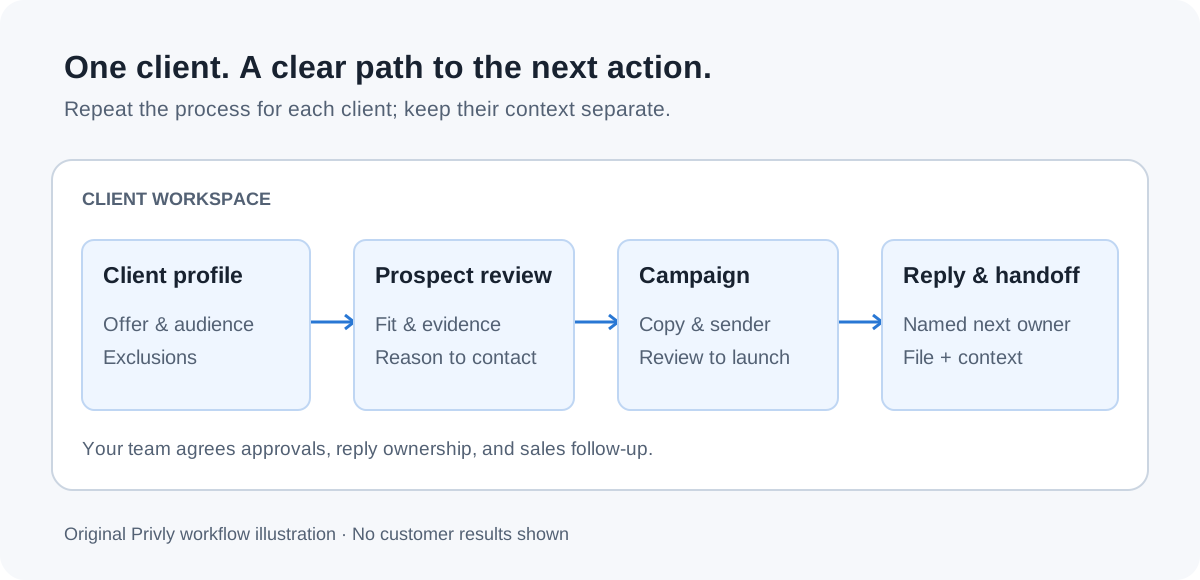
From the client brief to a reviewed campaign
Start with one client, one offer, and one audience. Privly helps you research people and prepare outreach; your agency sets the approval agreement and decides when a campaign is ready. Use the same checklist for every client while keeping the inputs specific.
| Step | In Privly | Decision for your agency |
|---|---|---|
| 1. Review the business | Review the client’s business profile, offer, ideal customer, and exclusions. | Does this reflect what the client sells today? |
| 2. Research and qualify | Find LinkedIn prospects and inspect the available fit and source evidence. | Why this person, for this client, now? A relevant job title alone does not establish buying intent. |
| 3. Organize the audience | Save reviewed leads in a client-specific list and select the campaign audience. | Are existing customers, poor fits, and people who asked to stop excluded? |
| 4. Prepare the campaign | Review message previews, sequence steps, execution mode, and the LinkedIn sender. | Has the client approved the offer and claims? Keep that sign-off in your agreed approval record. |
| 5. Handle the next action | Review conversations in Messages and export selected leads when a file is needed. | Who answers, who receives the handoff, and when do they act? |
Use the campaign setup guide for the product steps, and the workspace access guide before inviting client teammates or delegating sending.
Keep outreach under review
Prepare a message around an observed problem and a client-approved offer. Check the preview for the correct person, company, sender, and claim. If the evidence is weak, improve the prospect review before polishing the message.
Choose Manual or Outreach Autopilot deliberately for the reviewed campaign. Confirm the account’s current activity settings and any restrictions before launch. More client workspaces do not increase an individual LinkedIn account’s allowance.
LinkedIn’s policy on prohibited software and extensions restricts unauthorized automation. Activity controls do not guarantee account safety or permission from LinkedIn. Review the platform’s requirements with the account owner when choosing your delivery process.
Worked example: one client, one relevant conversation
Suppose a client sells month-end reporting software to finance teams at growing B2B SaaS companies. Your agency reviews that offer and excludes accounting firms and current customers. In the client workspace, a researcher finds a finance leader whose public post describes a slow month-end reporting process.
The reviewer checks the post, the person’s role, and company fit. The operator prepares a message offering the client’s approved reporting checklist. They confirm the sender and the campaign preview before launch. This example illustrates a workflow; it is not a customer result.
If the prospect asks how the software connects to their accounting system, the agency operator checks the conversation in Messages and hands the question to the client’s product specialist. The specialist owns the answer; the agency keeps the next step clear. Do not invent an integration claim to keep the conversation moving.
Make the CSV useful to the receiving team
Privly exports selected leads with Name, Headline, Location, LinkedIn URL, ICP fit, Email, and Email verified at. Email fields may be empty. The lead CSV does not include your client approval record, complete message history, or an assigned next owner.
Send the file with a separate handoff note naming the client, campaign, selection date, receiving owner, and next action. If your agency needs a CRM import, agree the destination and duplicate rules with the client first. Keep the source context and conversation summary alongside the file in your agreed sales process.
- Confirm that every selected lead belongs to the intended client workspace.
- Keep interested replies separate from requests to stop or people who are outside the audience.
- Ask the client to confirm meetings and sales outcomes; a reply is not automatically an opportunity.
Questions agencies ask before getting started
Can we manage more than one client?
Use a separate workspace for each client and review access before inviting teammates. Workspace, member, and sender capacity depend on your plan and add-ons. Check current pricing against the clients and authorized accounts you need to support.
Does Privly replace our client approval process?
Privly provides business-profile review, prospect context, and campaign previews. Your agency still agrees who approves targeting, copy, and launch, and where that sign-off is recorded. Product permissions govern what a teammate can do inside a workspace.
Who owns replies and reporting?
Review conversations in the relevant client workspace. Name an agency operator for routine responses and a client owner for specialist questions and sales follow-up. Use campaign activity and conversation context in your report, then reconcile meetings and sales outcomes with the client’s records.
Start with one client’s business profile
Choose one client and review what they sell, whom they serve, and which problems they solve. Use that profile to qualify the first audience and prepare a campaign your team can explain. Expand the process after the review and reply handoffs are clear.
The multi-client outreach guide explains the operating model. Use the agency scaling guide to plan capacity and the delivery playbook for the launch checklist and weekly client review.
Sources reviewed October 7, 2026: Gartner’s June 2025 buyer survey release, LinkedIn’s software policy, and Privly’s current workspace, campaign, message, and CSV-export implementation. The campaign, messages, handoff note, and diagram are original examples.