

LinkedIn Lead Generation Software for Account Executives
Published · Giress Kenn
Practical guidance for founders, B2B teams, and small agencies turning buyer signals into reviewed next actions.
Photo by Bluestonex on Unsplash
You discover a promising contact, then learn that a colleague already has an open opportunity at the same company. An account executive needs more than a new name and an engaging opening line. This guide explains how to evaluate LinkedIn lead generation software around territory eligibility, account context, and the next useful conversation—while keeping your existing sales relationships coherent.
What an account executive needs from lead generation software
For a self-sourcing AE, a useful prospecting workflow answers three questions: may I work this account, is there a relevant issue to investigate, and who should participate in the conversation? Software should make those decisions easier before it increases activity.
The same tool can be useful to an SDR and an AE, but their completion points differ. The SDR may hand over an accepted conversation. The AE must carry the context into discovery, evaluation, and a commercial decision. Decide which information needs to survive those transitions before buying another prospect database.
Start with the account constraint that defines your territory
If you have named accounts, begin with that list. Researching an interesting person outside it creates work you may need to hand off. If you cover a segment, define its company type, geography, exclusions, and delivery requirements before reviewing newly discovered businesses.
Check the CRM and your team’s account rules before adding a person to outreach. Look for the current account owner, customer status, open opportunities, recent contact, and any do-not-contact instruction. Record a decision: eligible, coordinate with owner, or hold. A new lead record is not proof that an account has no existing relationship.
| Check | Example decision | Next action |
|---|---|---|
| Assigned territory | The distributor belongs to another AE | Send the research to the account owner |
| Active opportunity | A colleague is discussing the same workflow | Agree a useful role before contacting anyone |
| Existing customer | The issue concerns adoption of a current product | Coordinate with the customer team |
| Fit and exclusions | The company is outside the supported region | Exclude it from this campaign |
| Eligible account, no known overlap | The segment and relationship checks pass | Investigate evidence and choose one next step |
The CRM and webhook guide explains why contact export and complete account synchronization are different requirements. Verify the fields and direction of any integration you intend to rely on.
Choose between account monitoring and new-account discovery
Known-account monitoring starts with a company you already want to understand. New-account discovery starts with evidence or audience criteria and asks whether the company should enter your territory list. Both can be useful; keep the source of the recommendation clear.
For monitoring, save the people and companies that matter and review relevant changes. For discovery, verify the company and its relationship to your offer before treating the result as an account worth pursuing. In either workflow, a job change, hiring announcement, or public discussion supplies context for research rather than a confirmed purchase.
LinkedIn’s Sales Navigator alerts documentation describes updates for saved leads and accounts. Privly’s buyer-intent workflow focuses on prospect evidence and review. Evaluate the two against the information you need, without assuming data automatically moves between them.
Turn source evidence into a useful question
Read the original source, its date, and the surrounding discussion. Separate what the person said from your interpretation. A post about purchase approvals might support a question about handovers; it does not establish a replacement project, available budget, or dissatisfaction with a named vendor.
Then decide what you can contribute. You might offer a relevant process example, ask how the team handles an exception, or clarify whether the problem affects one location or several. A message becomes easier to answer when its purpose is specific.
Use the original-source review guide to keep the supporting context accessible. If later replies change the meaning of the original post, change the message or do not send it.
Build a stakeholder map from answers, not job-title assumptions
An operations manager may describe a problem without owning its budget. A senior executive may approve spending without evaluating the workflow. Map the roles you still need to understand and mark them unconfirmed until conversation or reliable account information supports them.
Multi-threading means developing relevant relationships with more than one participant in an account. It does not mean sending the same pitch to everyone at once. Start with the person closest to the issue, ask who else is involved when appropriate, and coordinate subsequent contact with the current conversation.
Sales Navigator Relationship Maps allow users to organize leads and assign roles such as evaluator or decision maker. LinkedIn’s Relationship Maps FAQ says the maps are manually built. Treat a role label as a maintained account hypothesis, not independent proof of buying authority.
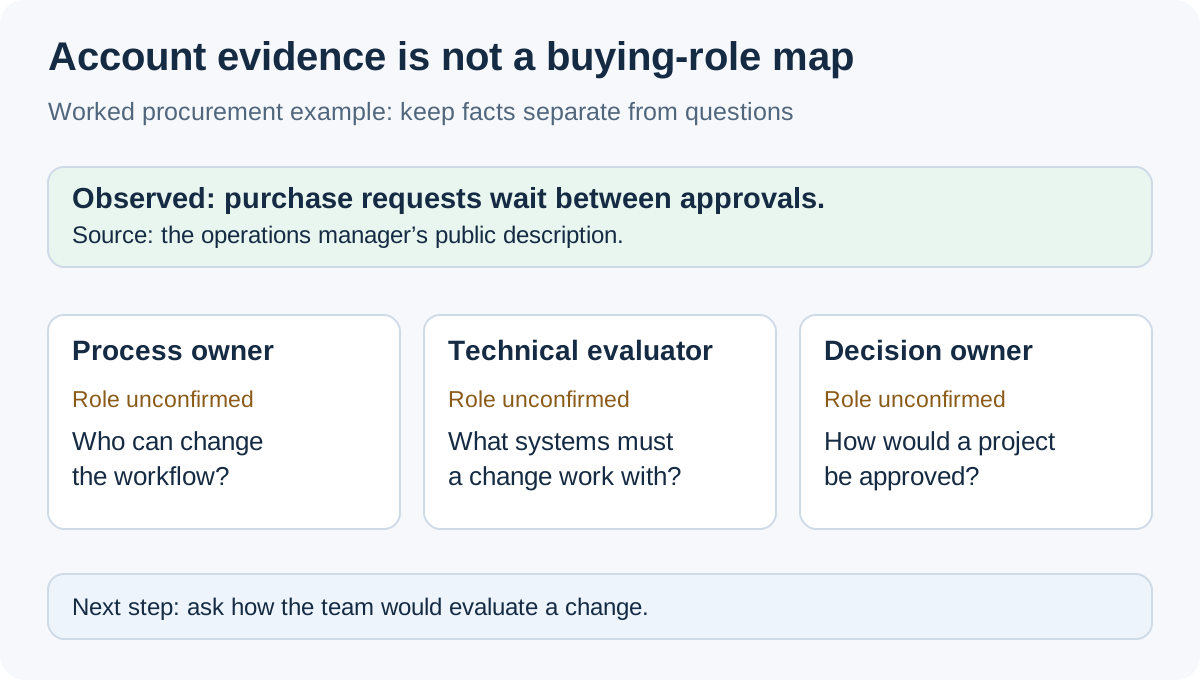
| Possible role | What is known | What to ask or verify |
|---|---|---|
| Workflow user | Morgan describes delayed purchase approvals | Where does the delay occur and who feels it? |
| Process owner | Not yet identified | Who is responsible for changing the approval process? |
| Technical evaluator | Not yet identified | Which systems would a change need to work with? |
| Commercial decision owner | Not yet identified | How would the team evaluate and approve a project? |
Preserve the conversation when the opportunity develops
When Morgan replies, update the account notes with the actual answer and the next commitment. If Priya promises an example, deliver it before requesting a meeting. If the buyer names another colleague, record the introduction context so the next message does not look like an unrelated approach.
Keep discovery notes and opportunity stages in the team’s agreed system of record. An outreach reply, a booked meeting, an accepted opportunity, and closed revenue are different events. Decide when each one is recorded and who is responsible, especially when an SDR or another AE becomes involved.
In Privly, review the lead and conversation context before deciding whether to use a campaign or an individual action. The selected sender, audience, and reviewed message should reflect the account plan. Existing relationships deserve deliberate review even when automated execution is available.
The leads and messages guide provides the product reference. For team handoffs, use the SDR and BDR workflow to agree what the receiving seller needs.
Evaluate software on a small set of eligible accounts
Choose a manageable sample from your actual territory, including an untouched account, a known relationship, and an account you should exclude. Ask the intended AE to research each one, find the underlying evidence, and write the next action. This exercise reveals whether the workflow respects the constraints of the job.
Keep a review log with the time spent, missing information, rejection reason, and action selected. If most rejected records are outside the territory, improve eligibility filtering. If the evidence is relevant but the next step is unclear, work on qualification and messaging. Those are different fixes.
Compare subscription cost with the research and follow-up work the tool supports. Separate member seats from connected senders and verify any CRM requirement. A short evaluation can establish workflow fit; it cannot reliably establish closed revenue before the relevant sales cycle has elapsed.
Review LinkedIn’s automated-activity policy when considering any third-party tool. Scheduling or pacing settings do not create LinkedIn approval for automated activity.
Questions self-sourcing AEs ask
Can an AE generate LinkedIn leads without an SDR?
Yes. The AE can own research, initial contact, and qualification. Start with a workload that leaves time to handle the conversations you create and the opportunities already in progress.
Should every account have several contacts in a sequence?
No. Identify relevant roles and coordinate the purpose of each conversation. Contacting more people without account context can create overlapping or contradictory approaches.
Does exporting a contact update every part of the CRM?
Only the fields and operations supported by the integration are transferred. Review the export result and confirm how account ownership, notes, and opportunity history are handled separately.
Start with a territory you can actually work
Explore Privly for B2B sales teams with a small set of eligible accounts. Compare the research and conversation context with your current process before expanding.
Source note: reviewed November 19, 2026. LinkedIn’s official alerts, Relationship Maps, and platform-policy documentation are linked beside the relevant explanations. The procurement scenario and stakeholder worksheet are original examples; no conversion or revenue outcome is claimed.
 Agency Reporting
LinkedIn Lead Generation Software With Client Reporting
Compare LinkedIn client reporting software using a practical metrics worksheet, permission checks, attribution rules, and an agency reporting example.
November 19, 2026 · Giress Kenn Ideal Customer Profile
LinkedIn Prospecting Software That Starts With Your Company Website
Turn your company website into a reviewed LinkedIn prospecting brief. Use a profile worksheet, exclusions, and sample-lead review before launching outreach.
November 19, 2026 · Giress Kenn Buyer Intent
LinkedIn Intent Monitoring Tools: Compare Scan Frequency and Signal Freshness
Compare LinkedIn intent monitoring with four timestamps, a freshness worksheet, and a worked example. Separate scan cadence from useful buying evidence.
November 19, 2026 · Giress Kenn