

LinkedIn Client Acquisition Software for Recruiting and Staffing Agencies
Published · Giress Kenn
Practical guidance for founders, B2B teams, and small agencies turning buyer signals into reviewed next actions.
Photo by Vitaly Gariev on Unsplash
Recruiting agencies need to distinguish employer business development from candidate sourcing. A tool that helps locate potential candidates does not necessarily help identify employers willing to engage an external recruiter. For client acquisition, evaluate the employer’s problem, the type of staffing engagement you offer, and the person who can discuss that engagement. Privly can support prospect research and reviewed outreach; it should not be presented as an applicant tracking system.
Quick Answer
Recruiting and staffing agencies should evaluate LinkedIn client acquisition software by employer fit, relevant hiring context, and outreach quality. Privly supports reviewing evidence and preparing campaigns. A vacancy or hiring announcement is a research signal, not proof that the employer needs an agency, has approved a fee, or will accept unsolicited candidates.
Are you selling recruiting, temporary staffing, or another service?
Define the commercial engagement first. Permanent placement, temporary staffing, and a scoped recruiting project can involve different buyers and delivery requirements. A broad audience of “companies hiring” conceals those differences.
Use the business profile guide to specify the roles, industries, locations, and services you actually cover. Include exclusions when a request falls outside your delivery capability.
For example, an agency specializing in manufacturing maintenance roles should not imply expertise in executive search merely because a company has an open leadership position. The profile should make the specialization easier to preserve throughout the campaign.
What does public hiring context establish?
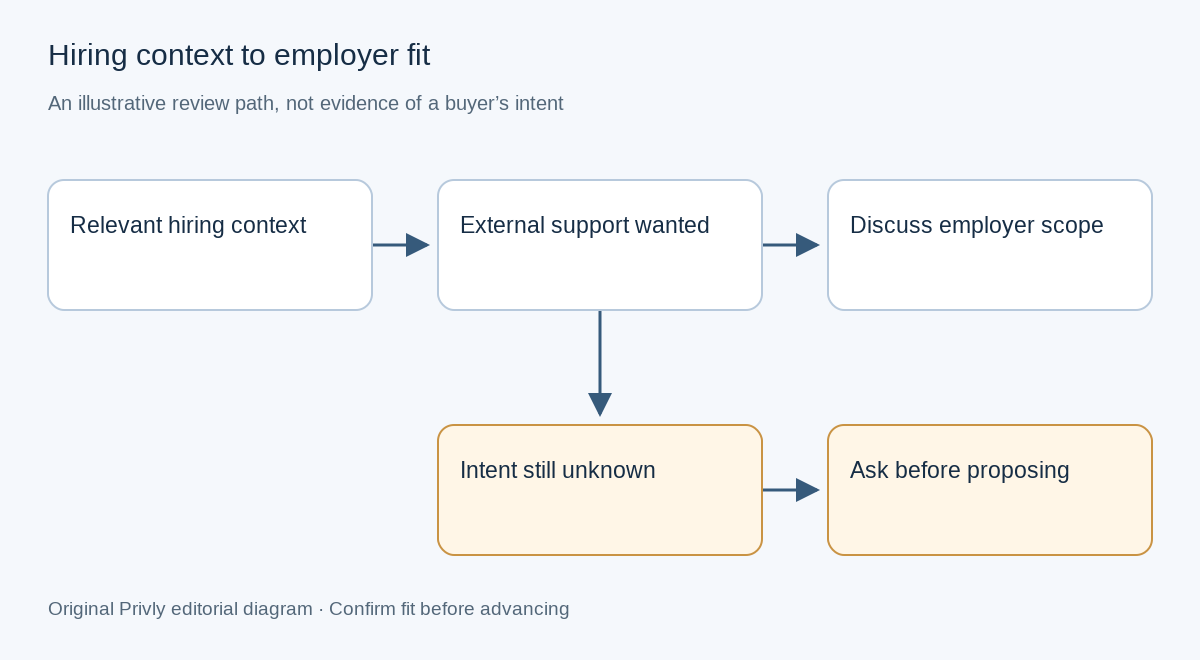
It can establish that the employer is discussing hiring or an operational need. It does not establish an agency relationship, an approved budget, or difficulty filling the position.
Evaluate buyer-intent monitoring for the context it exposes. Then follow the opportunity review workflow to inspect the original source and timing.
A post may have been updated, filled, or written by someone without authority over vendors. Read the surrounding conversation before deciding whether an approach is relevant.
Do not turn an employer’s vacancy into a claim that your agency already has suitable candidates. Candidate availability and permission to share their information require separate verification.
How should the first conversation qualify the employer?
Clarify whether the person owns the requirement, whether external support is being considered, and whether the engagement matches your service. Keep unanswered questions visible rather than treating a hiring signal as a completed qualification.
Privly’s evidence-based qualification overview helps separate fit and timing. Apply your agency’s own commercial criteria alongside that evidence.
A hypothetical U.S. staffing firm sees a plant leader discussing an upcoming expansion. The agency checks the relevant role and service geography, then asks whether the staffing plan includes outside support. It does not claim that the expansion is understaffed or promise candidates before confirming availability.
This is an illustrative business-development scenario, not a customer result or a claim of automatic job-feed monitoring.
Keep employer acquisition separate from candidate records
Use prospecting records for the employer conversation. Keep candidate applications, assessments, placement details, and other recruiting operations in the systems designated for them.
The leads and messages guide documents prospect organization and outreach. It does not establish applicant tracking, resume parsing, or placement management.
If employer contacts must enter your ATS or CRM, inspect the integration evaluation guide. Verify the actual destination, fields, and matching rules. Do not infer a native ATS integration from the existence of a CRM export.
Avoid placing unnecessary candidate information into a prospecting message. An employer’s public post does not authorize sharing another person’s private details.
What should you demonstrate before buying?
Test one specialization with a small reviewed selection of employer prospects. For each, ask the operator to explain the service fit and the evidence supporting contact.
Review the campaign using the campaign setup guide. Check that later steps do not imply an established search mandate or candidate relationship when none exists.
Compare plan allowances with the number of actual operators and senders. Include the work of responding to employer questions and qualifying engagement terms. More records do not necessarily mean more viable searches.
LinkedIn’s automation rules remain separate from vendor controls. Do not assume software use is authorized because it includes activity limits.
Measure employer opportunities rather than hiring mentions
Track relevant employer conversations, confirmed interest in your service, and agreed next steps separately. A vacancy discovered, a connection accepted, and an engagement signed are different outcomes.
Review why prospects are rejected. If many employers are outside your specialization, improve the audience definition. If they fit but do not use external recruiters, improve the commercial qualification rather than increasing sequence length.
The software is useful when it helps your team reach and understand appropriate employers. It does not replace the expertise needed to deliver the recruiting engagement.
Employer opportunity worksheet
Use this record for one offer and one audience. The examples are illustrative; they do not describe a Privly customer or guarantee an outcome.
| Review area | Record the observation | Resolve before advancing |
|---|---|---|
| Service | A defined recruiting or staffing specialism | Does the employer use this service model? |
| Hiring context | An employer describes a relevant hiring need | Is external help wanted or budgeted? |
| Scope | Roles, location, timing, and decision participants | Can your agency deliver suitable coverage? |
| Handoff | Employer opportunity and agreed next action | Which candidate details belong only in the ATS? |
FAQ
Is Privly an applicant tracking system?
The reviewed sources establish prospecting and outreach workflows, not ATS functionality. Verify any recruiting-system requirement separately.
Does a job opening mean an employer will hire an agency?
No. Confirm the employer’s willingness to use external support and the relevant engagement requirements.
Can we claim to have candidates ready?
Only when that statement is accurate and the information can appropriately be shared. A generated draft is not evidence of candidate availability.
What should we evaluate first?
One employer segment and recruiting specialization, with clear qualification questions and a named owner for replies.
Test an employer acquisition workflow
Review Privly’s prospecting plans against your employer-development process, then validate fit and conversation quality before increasing activity.
Sources and further reading
The linked product guides describe the workflow; confirm current availability and terms before choosing a plan. Examples and worksheets are illustrative, not customer results.
LinkedIn’s automated activity policy restricts automated activity. Vendor settings do not grant platform permission.
 Bootstrapped Startups
LinkedIn Lead Generation Software for Bootstrapped Startups
Choose LinkedIn prospecting software around runway, founder time, qualified conversations, and the cost of a realistic first campaign.
November 25, 2026 · Giress Kenn Marketing Agencies
LinkedIn Client Acquisition Software for B2B Marketing Agencies
Choose LinkedIn acquisition software for your agency’s own pipeline by offer fit, buying evidence, sales ownership, and proposal quality.
November 25, 2026 · Giress Kenn Appointment Setting
LinkedIn Outreach Software for Appointment-Setting Agencies
Evaluate appointment-setting software by meeting definitions, client evidence, sender access, reply handling, and sales handoff quality.
November 25, 2026 · Giress Kenn