

ChatGPT for Sales Prospecting: Find Leads and Run LinkedIn Outreach
Published · Giress Kenn
Practical guidance for founders, B2B teams, and small agencies turning buyer signals into reviewed next actions.
Photo by Julio Lopez on Unsplash
ChatGPT can help you research an account and write a first message. Getting that message to the right person takes a connected workflow: qualified leads, a LinkedIn sender, a campaign, and your approval. This guide shows how to use ChatGPT for sales prospecting, with practical prompts and a Privly connection that keeps lead review and LinkedIn outreach together.
What ChatGPT for Sales changes for prospecting
OpenAI’s November 17, 2026 ChatGPT for Sales announcement brings sales workflows and connected tools into the conversation. Its Sales plugin helps with account research, meeting preparation, and follow-ups. The announcement names Apollo, Clay, and Common Room for account signals, alongside Outreach and Salesloft for outreach planning.
According to OpenAI’s setup guide, Sales is available across ChatGPT plans, including Free. Partner availability and permissions vary. Installing Sales does not include paid partner subscriptions or authorize every account. You choose the tools your workflow needs and connect them separately.
For a founder or small sales team, the useful question is what happens after the research. Can you inspect the source, choose the right prospect, prepare a message, and approve the next action without rebuilding the list in another tool? Map those steps before adding subscriptions.
One Privly connection for leads and LinkedIn outreach
Privly combines lead discovery and qualification with campaign preparation and LinkedIn delivery. Its MCP connection gives ChatGPT permission to work with your Privly workspace. MCP is simply the connection that lets the assistant use the product’s tools; your account permissions still apply.
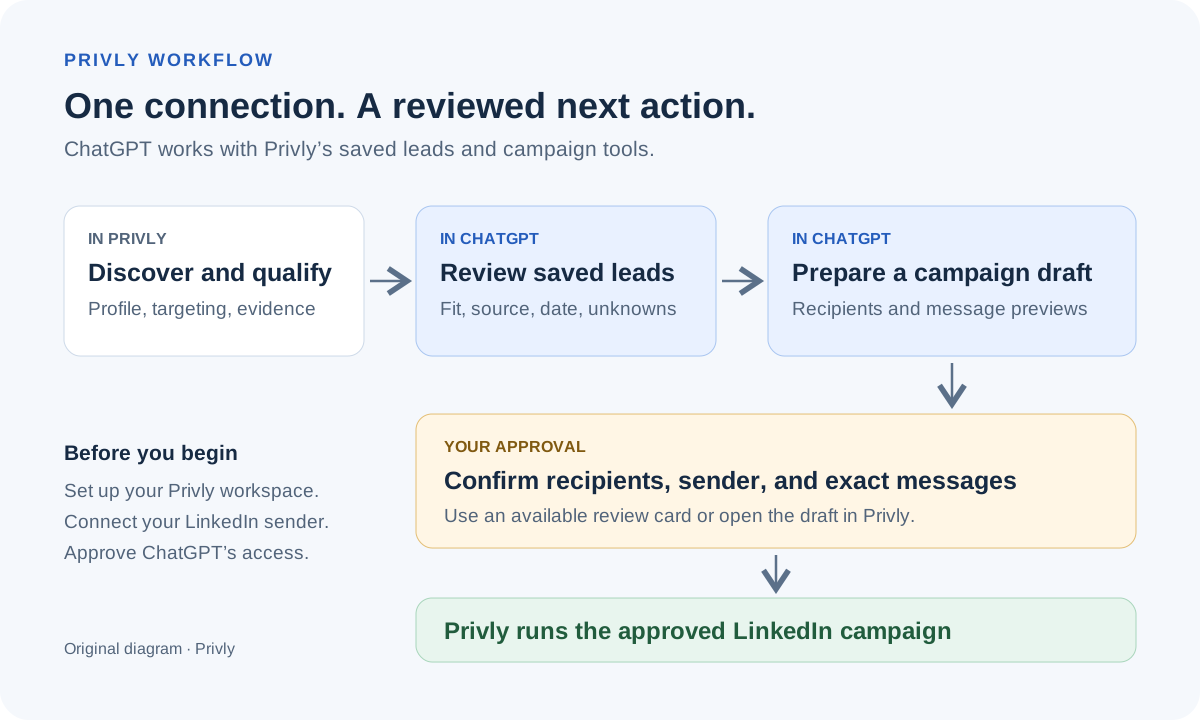
Once your Privly workspace and LinkedIn sender are set up, one Privly connection to ChatGPT lets you search saved qualified leads, inspect available evidence, prepare campaign drafts, and review messages. Approve through an available in-chat review card or continue through the draft’s Privly review link. Connecting the tools does not itself approve sending.
| Your starting point | A practical route | What to check |
|---|---|---|
| You already use a CRM, a prospecting database, and an engagement platform. | Connect the relevant tools to ChatGPT and keep their existing responsibilities. | Each connection’s supported actions, access, subscriptions, and handoffs. |
| You want qualified leads and LinkedIn campaigns in one product. | Set up Privly, then connect its workspace to ChatGPT. | Saved lead evidence, a connected LinkedIn sender, draft access, and the approval route. |
| You only need help researching and writing a few messages. | Use ChatGPT with verified source material and review/send manually. | Correct identities and facts, existing conversations, and your own sending process. |
One connection means one Privly connection inside ChatGPT. You still need a Privly account with the required access and a connected LinkedIn account for sending. ChatGPT’s custom-connection availability can also depend on your workspace settings.
LinkedIn features also exist elsewhere: Outreach documents LinkedIn sequence tasks and Salesloft documents Sales Navigator steps. Those product features do not establish which actions their ChatGPT plugins can perform. Compare the actual research-to-send workflow rather than counting integration logos.
Connect Privly to ChatGPT
First complete your business profile and targeting in Privly so its leads reflect the customers you serve. Connect the LinkedIn account you intend to send from. Keep discovery, account setup, and campaign approval as explicit steps.
- In Privly, open Settings → Integrations → AI apps (MCP), then open the setup guide and copy your connector URL.
- In ChatGPT, open Plugins, select the plus button, and choose Add custom MCP server. Name it Privly and paste the URL.
- Choose OAuth authentication and dynamic registration if requested. Review the connection warning, create the plugin, and sign in to Privly.
- Select the workspaces to share and review the requested access. Install the resulting plugin, then type @ and choose Privly in a chat.
Follow the current Privly setup guide and OpenAI custom-connection instructions if navigation differs. If the option is missing, check workspace permissions. The Sales plugin is optional for calling Privly’s connected tools directly.
Step 1: Find qualified leads and check the evidence
Start with the buyer you can help: company type, role, problem, and exclusions. A long list is hard to review when those criteria are vague. Pick a small batch and require a reason for every inclusion.
Through Privly’s connection, lead search retrieves saved qualified leads. It does not start a fresh web-wide discovery run. If the workspace has no suitable matches, revisit targeting and discovery in Privly before asking ChatGPT to write outreach.
Open the source behind the reason to reach out. Check who said it, when, and whether it concerns the same company and problem. Our B2B buying signals guide explains why a hiring announcement and a direct request for recommendations deserve different interpretations.
| Check | Record | If it is missing |
|---|---|---|
| Identity and fit | Person, current role, company, and the criteria they meet. | Research further before adding them. |
| Evidence | Original source, date, and the specific observed fact. | Do not claim they expressed a need. |
| Relevance | How your offer relates to that fact. | Reconsider the outreach angle. |
| Contact history | Previous messages, replies, exclusions, and current relationship. | Check existing records before enrolling. |
| Next action | Approve for drafting, research further, or exclude. | Keep the prospect out of the send queue. |
Step 2: Turn a buying signal into a useful message
Consider a fictional example: you sell creative review software for agencies. Leila, an agency founder, asks for recommendations because client feedback on video projects is scattered across email threads. Her company fits your target profile. The post supports a conversation about review tools; it says nothing about her budget or purchasing deadline.
The job of the message is to open that conversation. Ask about the observed problem and offer something you can actually deliver. Avoid turning an interpretation into a claim that the person is actively buying.
The question gives Leila something specific to answer without assuming she wants a demo. For a SaaS buyer, apply the same method to a documented implementation problem or request for alternatives. If all you have is company growth, ask a relevant question without pretending to know their internal pain.
For more message examples and follow-up decisions, use the LinkedIn outreach strategy guide.
Step 3: Review and approve LinkedIn outreach
Review the rendered message for each recipient, not just the template. Confirm that the selected sender is correct, the audience belongs in this campaign, and the wording matches the evidence. Remove people who have already declined or are in an existing conversation.
Privly can return a draft review link. Supported, enabled interactive connections can also show an approval card in the conversation. If that card is unavailable, open the draft in Privly and complete the campaign review there. A request to draft messages is not a request to send them.
After approval, Privly handles the campaign through its sending workflow and pacing rules. An approved or queued campaign is not proof that a message has been delivered. Check campaign progress and investigate connection or permission issues before retrying an action.
Keep the campaign’s manual message approval step meaningful: review the actual audience and copy whenever the draft changes.
Step 4: Track conversations, not generated messages
Review campaign progress in the same workspace. Separate invitations sent, acceptances, delivered messages, replies, and meetings. They answer different questions: acceptance tells you someone connected; a relevant reply tells you the conversation has started.
For an initial pilot, record setup time, source-checking time, corrections, and any manual handoffs. Compare those observations with your current process. That tells you whether the connected workflow is useful for your team without treating generated drafts as sales results.
Common mistakes when using ChatGPT for sales prospecting
- Treating a polished summary as evidence. Read the linked source before using its claim in a message.
- Confusing account fit with buying intent. A suitable company may have no current need; keep that uncertainty visible.
- Assuming a plugin can perform every action in its underlying product. Check the tools and permissions available in your connection.
- Moving a draft straight into sending. Confirm the recipient, LinkedIn sender, and rendered copy first.
- Repeating a launch because delivery is not immediate. Read the recorded campaign state before taking another action.
Questions about ChatGPT, Privly, and LinkedIn outreach
Can ChatGPT find sales leads?
ChatGPT can help research prospects using available sources and connected tools. With Privly connected, it can search saved qualified leads and examine their available evidence. Set up discovery in Privly to build that pool; the connected lead-search action does not launch a new discovery run.
Can ChatGPT send LinkedIn messages?
Writing a message in ChatGPT does not send it. Through Privly, you can prepare a LinkedIn campaign and review it before launch. In-chat approval depends on the connection’s interactive support and permissions; otherwise, approve through the Privly review link. Privly runs the approved campaign using your connected LinkedIn sender.
Do I need several sales tools or the Sales plugin?
The tools you need depend on your workflow. You can keep an existing sales stack or use Privly for its lead-to-LinkedIn campaign workflow. Privly’s connected tools can be used directly without the Sales plugin. You still need the relevant Privly plan, account permissions, and LinkedIn connection.
Does the free Sales plugin include Privly?
No. OpenAI distinguishes plugin access from partner subscriptions. Privly access is separate. Check current Privly plans and your ChatGPT workspace’s custom-connection permissions before setting up the workflow.
Bring your next prospecting workflow into ChatGPT
Start with a reviewed buyer profile, a small set of qualified leads, and a clear approval step. Privly keeps the evidence, campaign draft, and LinkedIn execution in one product, while ChatGPT gives you a conversational way to work with them.
Start with Privly, complete your workspace setup, and connect it to ChatGPT when you are ready to review leads and prepare your first campaign.
Sources and examples
Product documentation reviewed November 18, 2026: OpenAI’s announcement, Sales setup guide, custom MCP connection guide, Outreach LinkedIn tasks, and Salesloft Sales Navigator steps. Prompts, the review worksheet, and the workflow diagram are original Privly examples. Leila’s scenario is fictional. Product descriptions are based on documentation and Privly’s implemented workflow, not a comparative performance test.
 Agency Reporting
LinkedIn Lead Generation Software With Client Reporting
Compare LinkedIn client reporting software using a practical metrics worksheet, permission checks, attribution rules, and an agency reporting example.
November 19, 2026 · Giress Kenn Ideal Customer Profile
LinkedIn Prospecting Software That Starts With Your Company Website
Turn your company website into a reviewed LinkedIn prospecting brief. Use a profile worksheet, exclusions, and sample-lead review before launching outreach.
November 19, 2026 · Giress Kenn Buyer Intent
LinkedIn Intent Monitoring Tools: Compare Scan Frequency and Signal Freshness
Compare LinkedIn intent monitoring with four timestamps, a freshness worksheet, and a worked example. Separate scan cadence from useful buying evidence.
November 19, 2026 · Giress Kenn