

Best LinkedIn Prospecting and Outreach Tools for Canadian Teams
Published · Giress Kenn
Practical guidance for founders, B2B teams, and small agencies turning buyer signals into reviewed next actions.
Photo by Dan Dimmock on Unsplash
The best LinkedIn prospecting tool for a Canadian team depends on the missing part of its workflow. Searching for the right accounts, researching a problem, preparing outreach, and owning a reply require different capabilities. This shortlist compares those jobs, shows how to read pricing, and gives you a worksheet for checking the actual product before committing.
Choose the job before choosing the subscription
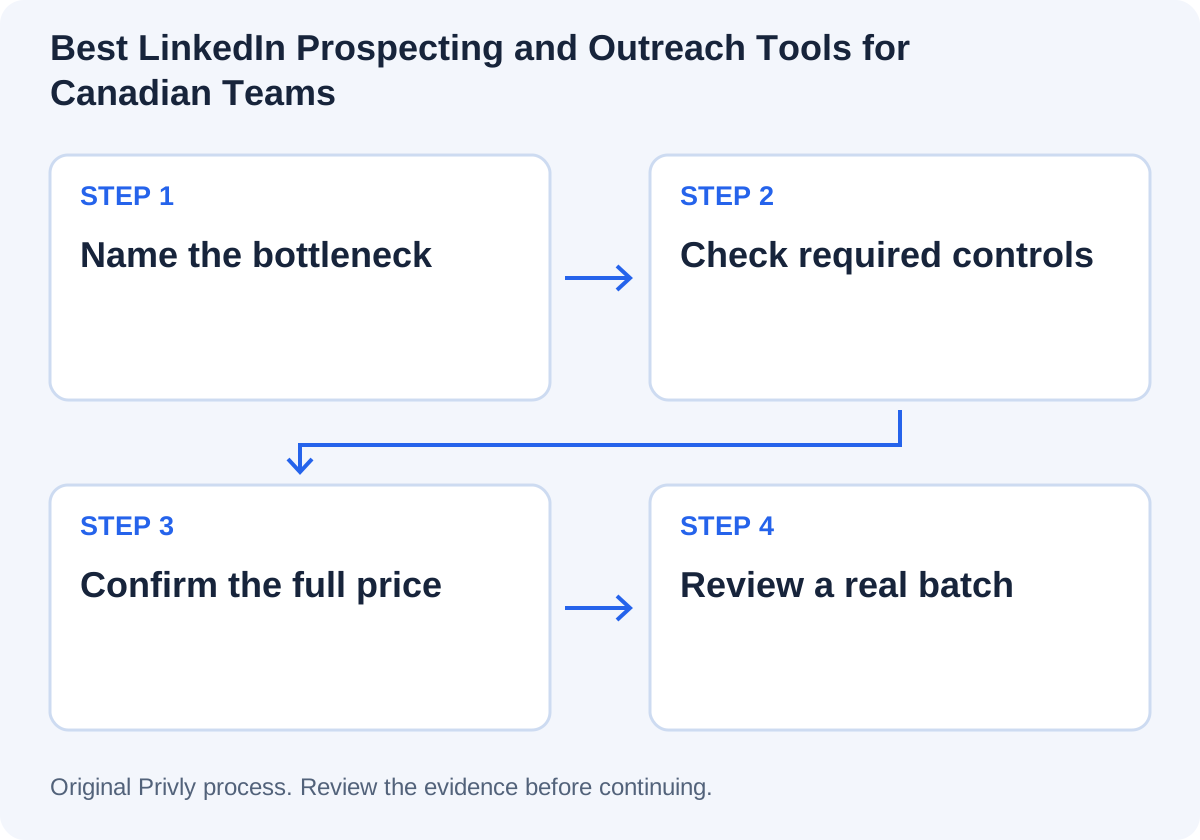
Write one sentence about the bottleneck. Do you lack a suitable company list, evidence about individual needs, a reviewed campaign process, or a reliable handoff? Buying another sender will not fix a vague audience. Adding research software will not decide who answers the client’s technical questions.
List essential requirements before the demo: service region, working language, sender ownership, client separation, source traceability, export fields, and the destination system. Treat unmet essential requirements as a reason to pause rather than balancing them against attractive features.
A shortlist organized by workflow
| Option | Job to investigate | Check before choosing |
|---|---|---|
| LinkedIn Sales Navigator | Native LinkedIn account and lead research | Plan features, actual search needs, sender access, and account pricing. |
| Clay | Web research and structured enrichment work | Source traceability, operator effort, usage units, and client data controls. |
| Apollo | Research within a prospecting workflow | Required information, output review, account limits, and export requirements. |
| Privly | Reviewed business context, leads, campaigns, and conversations | Workspace and sender capacity, available lead evidence, message preview, and reply ownership. |
These tools are candidates for different jobs, not interchangeable bundles. For a detailed research evaluation, use the AI lead generation guide. For client delivery, use the multi-client operating playbook.
From evidence to the next action
Read the price in the right currency and billing period
A monthly-looking number can require annual payment. Record the currency, payment schedule, minimum seats, research or contact usage, sender/workspace additions, and applicable taxes before comparing totals. Do not convert a US headline into a Canadian quote without checking the actual checkout.
On October 23, 2026, LinkedIn’s official comparison page listed Core starting at C$144.99 per month/license or C$1,199.88 per year/license, and Advanced at C$179.99 per month/license or C$2,039.88 per year/license. LinkedIn labels these estimates and notes possible tax, promotional, and device variations. Confirm the price offered to your account.
| Product | Official pricing reference | What to record |
|---|---|---|
| Sales Navigator | Localized CAD estimates on the official comparison page | Monthly versus annual total and actual account quote. |
| Clay pricing | Current plan and usage details | Billable unit, included allowance, overage, and permissions. |
| Apollo pricing | Current plan and account quote | Seats, research/contact usage, export limits, and commitment. |
| Privly pricing | Current plan and workspace/sender capacity | Base plan, required capacity, billing term, and checkout total. |
Stable numeric quotes for Clay and Apollo were not available in the public text retrieved for this review. Use the official pages and your account’s quote rather than treating an older third-party price as current.
Demonstrate the workflow with your own brief
Ask the operator to research a known company, handle a candidate with incomplete evidence, and show what a client reviewer can access. Open the source behind a qualification claim. Change the client context and confirm the first client’s private information is not exposed.
Prepare a sample export before assuming an integration removes manual work. Confirm the identity key, exact columns, duplicate behavior, and what stays in a separate note. In Privly, the selected-lead CSV contains identity and fit/contact columns; it does not carry the complete conversation or approval record.
| Requirement | Evidence you need |
|---|---|
| Audience | The tool can find or accept your target segment. |
| Research | A reviewer can check the fact and its current source. |
| Team access | The correct people can review without unintended client access. |
| Control | A result can be held back and a stop request handled. |
| Handoff | The receiving owner gets the needed context and identifiers. |
| Cost | A reviewed batch has predictable total cost, including operator time. |
Review the Canadian and platform requirements separately
A Canadian company address or a public LinkedIn profile does not establish a basis for commercial messaging. The channel, message purpose, consent basis or exemption, identification, and stop process need their own review. Buying software does not transfer that decision to the vendor.
Use the CASL outbound guide for the Canadian message review, and read LinkedIn’s published software restrictions for the actual collection and sending method. A tool describing itself as safe does not establish platform authorization.
Make a small, reversible selection first
Choose the lowest commitment that lets you test essential requirements. Assign a reviewer and record the time to create an accepted prospect record. Keep rejected and incomplete outputs in the evaluation so a large export cannot hide rework.
For example, a consultancy with a narrow list may need better evidence review before another database. An agency serving several clients may need client and sender separation before more enrichment capacity. Those are different purchasing decisions even if both teams search for a LinkedIn prospecting tool.
Use the same brief and acceptance rules when comparing products. Review source quality, errors, work, and cost before expanding. Only assess messaging outcomes after the contact process has been separately approved.
Canadian prospecting tool questions
Start with Privly’s free ICP identifier to clarify the audience, then use the worksheet to choose the capability your team is missing.
Research and source notes
Sources reviewed October 23, 2026. Examples and calculations are authored illustrations; vendor documentation describes capabilities rather than comparative performance.
 CASL
CASLCASL and Outbound Sales: Email and LinkedIn Prospecting in Canada
Review Canadian outbound email and LinkedIn messaging under CASL with official sources, consent and exemption distinctions, and a practical evidence checklist.
October 23, 2026 · Zyaam Ali AI Prospecting
AI Outreach Tools vs Manual Prospecting: Which Workflow Fits?
Compare AI-assisted and manual prospecting by task, review effort, evidence quality, and cost with a fair pilot plan and worked example.
October 23, 2026 · Zyaam Ali LinkedIn Outreach
How to Increase Your LinkedIn Reply Rate
Diagnose LinkedIn reply rates with clear denominators, a worked funnel, original message revisions, and a practical experiment worksheet.
October 23, 2026 · Giress Kenn