

Find people already looking for what you sell.
Add your website and Privly finds relevant people on LinkedIn, then helps you qualify and follow up.
VESTA GOT27 REPLIESIN 9 DAYS


Try Privly yourself. Click a lead or explore the sidebar.
Leads
Leads
CSV includedReview saved LinkedIn prospects, clean up statuses, and export your list when you are ready.
Only confirmed matches appear in Active leads.
| Actions | ||||||||
|---|---|---|---|---|---|---|---|---|
 Daniel BrooksFounder & CEO at Northstar Daniel BrooksFounder & CEO at Northstar | Founder & CEO at NorthstarNorthstar | We’re spending more time building prospect lists than talking to customers. Anyone found a better way to spot the right people before reaching out?We’re spending more time building prospect lists than talking to customers. Anyone found a better way to spot the right people before reaching out? | Hot | — | Oct 21, 2026Today | |||
 Riley ParkerCo-founder at Waypoint Riley ParkerCo-founder at Waypoint | Co-founder at WaypointWaypoint | Friday disappeared into researching leads again. Looking for a way to find people talking about the problems we solve, without living in search all day.Friday disappeared into researching leads again. Looking for a way to find people talking about the problems we solve, without living in search all day. | Hot | — | Oct 21, 2026Today | |||
 Avery PatelFounder & CEO at Brightpath Avery PatelFounder & CEO at Brightpath | Founder & CEO at BrightpathBrightpath | We’re spending more time building prospect lists than talking to customers. Anyone found a better way to spot the right people before reaching out?We’re spending more time building prospect lists than talking to customers. Anyone found a better way to spot the right people before reaching out? | Hot | — | Oct 21, 2026Today | |||
 Reese WilsonFounder & CEO at Beacon Reese WilsonFounder & CEO at Beacon | Founder & CEO at BeaconBeacon | We’re spending more time building prospect lists than talking to customers. Anyone found a better way to spot the right people before reaching out?We’re spending more time building prospect lists than talking to customers. Anyone found a better way to spot the right people before reaching out? | Hot | — | Oct 21, 2026Today | |||
 Blake TurnerAgency founder at Springboard Blake TurnerAgency founder at Springboard | Agency founder at SpringboardSpringboard | We’re bringing on our first outbound hire. I want them to start real conversations, not just send more messages. What would you put in their toolkit?We’re bringing on our first outbound hire. I want them to start real conversations, not just send more messages. What would you put in their toolkit? | Hot | — | Oct 21, 2026Today | |||
 Peyton CostaHead of Growth at Gather Peyton CostaHead of Growth at Gather | Head of Growth at GatherGather | Our team has plenty of contacts. What we’re missing is context. How are other growth teams qualifying who actually needs their product?Our team has plenty of contacts. What we’re missing is context. How are other growth teams qualifying who actually needs their product? | Hot | — | Oct 21, 2026Today | |||
 Charlie ReedCo-founder at Daybreak Charlie ReedCo-founder at Daybreak | Co-founder at DaybreakDaybreak | Friday disappeared into researching leads again. Looking for a way to find people talking about the problems we solve, without living in search all day.Friday disappeared into researching leads again. Looking for a way to find people talking about the problems we solve, without living in search all day. | Hot | — | Oct 21, 2026Today | |||
 Kendall JamesFounder & CEO at Oakwell Kendall JamesFounder & CEO at Oakwell | Founder & CEO at OakwellOakwell | We’re spending more time building prospect lists than talking to customers. Anyone found a better way to spot the right people before reaching out?We’re spending more time building prospect lists than talking to customers. Anyone found a better way to spot the right people before reaching out? | Hot | — | Oct 21, 2026Today | |||
 Morgan AdamsAgency founder at Cedar Morgan AdamsAgency founder at Cedar | Agency founder at CedarCedar | We’re bringing on our first outbound hire. I want them to start real conversations, not just send more messages. What would you put in their toolkit?We’re bringing on our first outbound hire. I want them to start real conversations, not just send more messages. What would you put in their toolkit? | Hot | — | Oct 21, 2026Today | |||
 Taylor AdamsCo-founder at Arc Taylor AdamsCo-founder at Arc | Co-founder at ArcArc | Friday disappeared into researching leads again. Looking for a way to find people talking about the problems we solve, without living in search all day.Friday disappeared into researching leads again. Looking for a way to find people talking about the problems we solve, without living in search all day. | Hot | — | Oct 21, 2026Today | |||
| Reese AdamsHead of Growth at Beacon | Head of Growth at BeaconBeacon | Our team has plenty of contacts. What we’re missing is context. How are other growth teams qualifying who actually needs their product?Our team has plenty of contacts. What we’re missing is context. How are other growth teams qualifying who actually needs their product? | Hot | — | Oct 21, 2026Today | |||
 Finley AdamsFounder & CEO at Orbit Finley AdamsFounder & CEO at Orbit | Founder & CEO at OrbitOrbit | We’re spending more time building prospect lists than talking to customers. Anyone found a better way to spot the right people before reaching out?We’re spending more time building prospect lists than talking to customers. Anyone found a better way to spot the right people before reaching out? | Hot | — | Oct 21, 2026Today | |||
| Peyton AdamsAgency founder at Gather | Agency founder at GatherGather | We’re bringing on our first outbound hire. I want them to start real conversations, not just send more messages. What would you put in their toolkit?We’re bringing on our first outbound hire. I want them to start real conversations, not just send more messages. What would you put in their toolkit? | Hot | — | Oct 21, 2026Today | |||
| Kendall AdamsHead of Growth at Oakwell | Head of Growth at OakwellOakwell | Our team has plenty of contacts. What we’re missing is context. How are other growth teams qualifying who actually needs their product?Our team has plenty of contacts. What we’re missing is context. How are other growth teams qualifying who actually needs their product? | Hot | — | Oct 21, 2026Today | |||
 Sam BakerCo-founder at Stride Sam BakerCo-founder at Stride | Co-founder at StrideStride | Friday disappeared into researching leads again. Looking for a way to find people talking about the problems we solve, without living in search all day.Friday disappeared into researching leads again. Looking for a way to find people talking about the problems we solve, without living in search all day. | Hot | — | Oct 21, 2026Today | |||
 Jamie BakerHead of Growth at Craftwork Jamie BakerHead of Growth at Craftwork | Head of Growth at CraftworkCraftwork | Our team has plenty of contacts. What we’re missing is context. How are other growth teams qualifying who actually needs their product?Our team has plenty of contacts. What we’re missing is context. How are other growth teams qualifying who actually needs their product? | Hot | — | Oct 21, 2026Today | |||
 Cameron BakerFounder & CEO at Juniper Cameron BakerFounder & CEO at Juniper | Founder & CEO at JuniperJuniper | We’re spending more time building prospect lists than talking to customers. Anyone found a better way to spot the right people before reaching out?We’re spending more time building prospect lists than talking to customers. Anyone found a better way to spot the right people before reaching out? | Hot | — | Oct 21, 2026Today | |||
| Reese BakerAgency founder at Beacon | Agency founder at BeaconBeacon | We’re bringing on our first outbound hire. I want them to start real conversations, not just send more messages. What would you put in their toolkit?We’re bringing on our first outbound hire. I want them to start real conversations, not just send more messages. What would you put in their toolkit? | Hot | — | Oct 21, 2026Today | |||
| Finley BakerHead of Growth at Orbit | Head of Growth at OrbitOrbit | Our team has plenty of contacts. What we’re missing is context. How are other growth teams qualifying who actually needs their product?Our team has plenty of contacts. What we’re missing is context. How are other growth teams qualifying who actually needs their product? | Hot | — | Oct 21, 2026Today | |||
 Hayden BakerCo-founder at Basis Hayden BakerCo-founder at Basis | Co-founder at BasisBasis | Friday disappeared into researching leads again. Looking for a way to find people talking about the problems we solve, without living in search all day.Friday disappeared into researching leads again. Looking for a way to find people talking about the problems we solve, without living in search all day. | Hot | — | Oct 21, 2026Today | |||
| Charlie BakerFounder & CEO at Daybreak | Founder & CEO at DaybreakDaybreak | We’re spending more time building prospect lists than talking to customers. Anyone found a better way to spot the right people before reaching out?We’re spending more time building prospect lists than talking to customers. Anyone found a better way to spot the right people before reaching out? | Hot | — | Oct 21, 2026Today | |||
| Jamie CarterAgency founder at Craftwork | Agency founder at CraftworkCraftwork | We’re bringing on our first outbound hire. I want them to start real conversations, not just send more messages. What would you put in their toolkit?We’re bringing on our first outbound hire. I want them to start real conversations, not just send more messages. What would you put in their toolkit? | Hot | — | Oct 21, 2026Today | |||
| Morgan CarterCo-founder at Cedar | Co-founder at CedarCedar | Friday disappeared into researching leads again. Looking for a way to find people talking about the problems we solve, without living in search all day.Friday disappeared into researching leads again. Looking for a way to find people talking about the problems we solve, without living in search all day. | Hot | — | Oct 21, 2026Today | |||
| Cameron CarterHead of Growth at Juniper | Head of Growth at JuniperJuniper | Our team has plenty of contacts. What we’re missing is context. How are other growth teams qualifying who actually needs their product?Our team has plenty of contacts. What we’re missing is context. How are other growth teams qualifying who actually needs their product? | Hot | — | Oct 21, 2026Today | |||
 Rowan CarterFounder & CEO at Thread Rowan CarterFounder & CEO at Thread | Founder & CEO at ThreadThread | We’re spending more time building prospect lists than talking to customers. Anyone found a better way to spot the right people before reaching out?We’re spending more time building prospect lists than talking to customers. Anyone found a better way to spot the right people before reaching out? | Hot | — | Oct 21, 2026Today |
Reported customer results
Turn hot leads into booked calls.
Find people you can help. Reach out with a reason. Let Privly handle the follow-ups.
10× More demos
Turn outreach into opportunity
16 Booked calls in 7 days
Turn leads into conversations
22% Reply rate
Up from 3% before Privly
5× More replies
Give people a reason to respond
One customer's week with Privly
600+
Hot leads gathered.
Less research. More room to sell.

“I used to spend Sunday evenings manually copying attendee names into a spreadsheet. Privly does the whole thing in under 8 minutes. My pipeline from events has tripled.”

Marcus T.Founder, B2B SaaS startup
“We run outbound for 12 clients. Privly replaced a listening tool, a sheet, and a sender with one review queue. Cleaner data, faster review, CSV into HubSpot.”

Lena R.Head of Growth, demand gen agency
“The opportunity while-fresh thing is real. Privly keeps relevant people and evidence together so our team can review the signal and decide on outreach while it still matters.”

James O.GTM lead, Series A startup
“I’ve been using Privly for my own outbound, and in a recent week it gathered 600+ hot leads (resulting in 16 calls booked in 7 days)”

Kevin BurberyOne week of outbound
What you get
More time for conversations that matter.
For founders, agencies, consultants, and lean B2B teams who do their best selling in a conversation.
Spend less time searching
Put prospect research back in its place.
Start with your website. Let Privly bring relevant people into view.
Focus on better-fit buyers
Give your attention to people you can help.
Review prospects against the customers you want to reach and the problems you solve.
Know why someone matters
See a reason to reach out, beyond a job title.
Read the original post alongside the person, so you can judge the opportunity yourself.
Start a relevant conversation
Open with something that matters to them.
Make the draft your own before you send. You decide when to reach out.
A better starting point
Go into the conversation with a reason.
Spend your time deciding who to help, with the research already in front of you.
Prospecting the hard way
- Hours spent on lists and profiles
- A job title, no clear reason to reach out
- Every message starts from scratch
Starting with Privly
- Relevant prospects, ready to review
- Their own words show a possible need
- A relevant draft to make your own
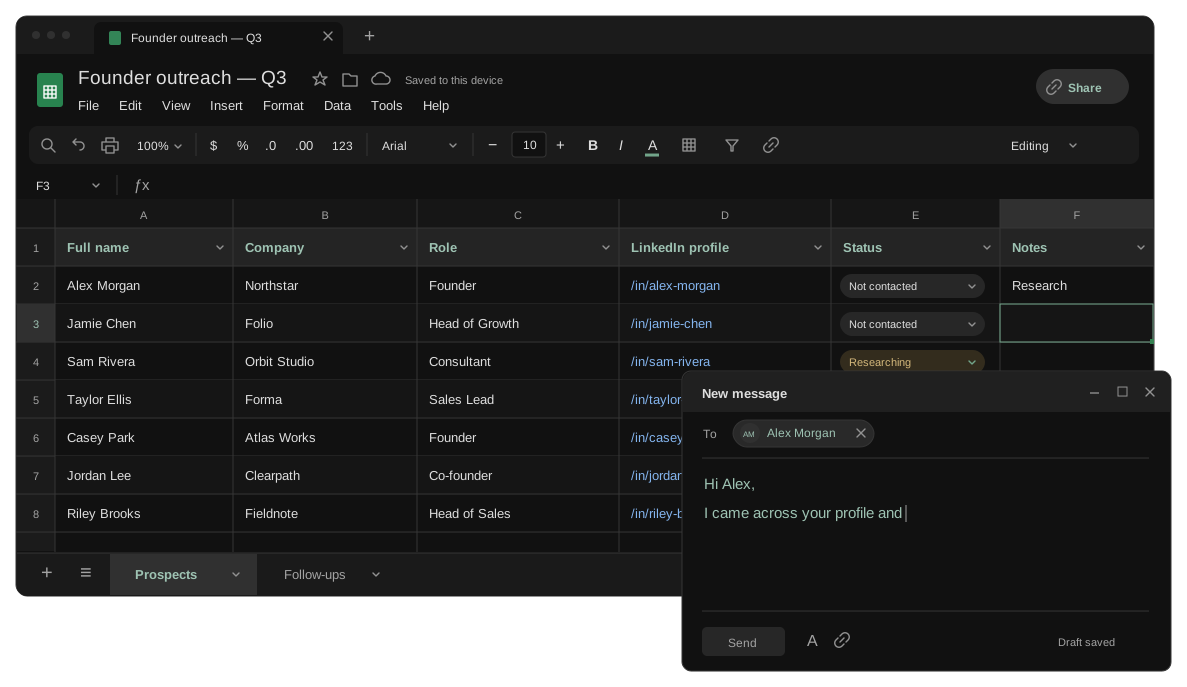

Prospecting on autopilot
Your next prospect, found on autopilot.
Once set up, Privly finds relevant people in the background and surfaces a reason to reach out. Generate an AI draft from that context, ready to make your own.

ONE CONNECTED SYSTEM
Less tool switching. More time for the right conversations.
Your website, your next prospect, and a relevant draft — together in one place. Keep the reason to reach out with you at every step.
Automated follow-ups
Put your outreach campaigns on autopilot.
Set your messages and timing once. Privly sends your sequence automatically, so you can focus on the people who reply.
Turn on Autopilot for a campaign. Follow-ups stop when someone replies, and you can pause anytime.
FAQ
A few things before you start.
Your website. Privly drafts a profile of your business and ideal customers. Review it, make any changes, and start looking for relevant people.
Start with your website
Your next customer starts with the right conversation.
Find people you can help — and a reason to reach out. Start with your website.