The Best Buffer Alternative for Small Teams in 2026
Practical guidance for founders, B2B teams, and small agencies turning buyer signals into outreach, content, and go-to-market action.

Why small teams outgrow Buffer
Buffer was the go-to social media scheduler for years — simple, clean, affordable. But in 2026, small teams are running into the same friction points:
- AI features feel bolted on, not built in
- Per-seat pricing scales fast once you add a second or third person
- No approval workflows for teams that need a content review step
- Limited analytics — you get post performance, but not the full picture
If you have been Googling "Buffer alternative", you are not alone. Here is an honest breakdown of what is actually out there.
For the focused founder-led SaaS comparison, start with the Buffer vs Privly comparison.
When Buffer is still a good fit
Buffer remains a good choice for a specific type of team: simple queue, simple channels, simple workflow.
It can still work well if:
- One person manages social media
- You only publish to a few channels
- You already write finished captions elsewhere
- You do not need approval steps
- You want a lightweight publishing queue more than a full content workflow
That is why Buffer has lasted so long. It is clean, familiar, and easy to understand.
The problem appears when the workflow grows. Once you need AI drafting, channel-specific rewrites, teammate review, more platforms, and better campaign visibility, Buffer starts to feel like a posting utility instead of a marketing system.
What to look for in a Buffer alternative
Before comparing tools, define what "better" means for your team:
| Need | What to look for |
|---|---|
| Cheaper per-seat pricing | Flat-rate or unlimited-seats plans |
| AI writing assistance | Native AI — not just an OpenAI API wrapper |
| Team collaboration | Approval workflows, comment threads, roles |
| More platforms | TikTok, Threads, YouTube Shorts support |
| Better analytics | Audience insights, competitor tracking |
| Simpler UX | Less setup, faster onboarding |
The decision criteria that matter most for small teams
A good Buffer alternative should not simply have more features. It should remove the specific friction that made you search for an alternative in the first place.
Use these criteria before looking at pricing pages:
1. Does it help create content, or only schedule finished content?
If your team already has polished captions, a simple scheduler is fine. But most small teams are still working through the idea, hook, tone, and CTA at the moment they open the tool.
That is where AI-first workflows matter. The tool should help you generate a starting point, refine the draft, and adapt it for each channel without switching tabs.
2. Does it support your actual channel mix?
A tool that works well for LinkedIn and X may not be enough if your team also needs TikTok, Threads, YouTube, Facebook, Instagram, Pinterest, or Reddit.
Before switching, list the channels that matter today and the ones you expect to add in the next 6 months. Choose a tool that will not force another migration later.
3. Does collaboration feel lightweight?
Small teams do not need complicated enterprise approval maps, but they do need handoffs.
Look for:
- Clear ownership
- Draft visibility
- Easy review
- The ability to keep teammates in the same workspace
- Pricing that does not punish collaboration
4. Does the calendar help you plan, not just queue?
The best scheduler should make the week obvious. If you can see gaps, campaign timing, platform mix, and publish status at a glance, you are more likely to stay consistent.
If your team still plans in a spreadsheet first, pair the tool decision with a content calendar that is easy to maintain. The scheduler should make that plan easier to execute, not create a second disconnected system.
Top Buffer alternatives for small teams in 2026
1. Privly — best for AI-first social media management
Privly (privly.app) is built from the ground up with AI in the core workflow — not added as an afterthought. Where Buffer asks you to write your own posts and just schedule them, Privly helps you draft, adapt, and publish across platforms from a single interface.
Why small teams choose Privly over Buffer:
- AI draft generation — start from a topic, not a blank text box
- One-click cross-platform adaptation — a LinkedIn post becomes a tweet thread without manual rewriting
- Flat pricing — no penalty for adding team members
- Calendar view — see your whole month's content at a glance
- Built-in approval workflow — perfect for founders who want a designer or VA to review before publish
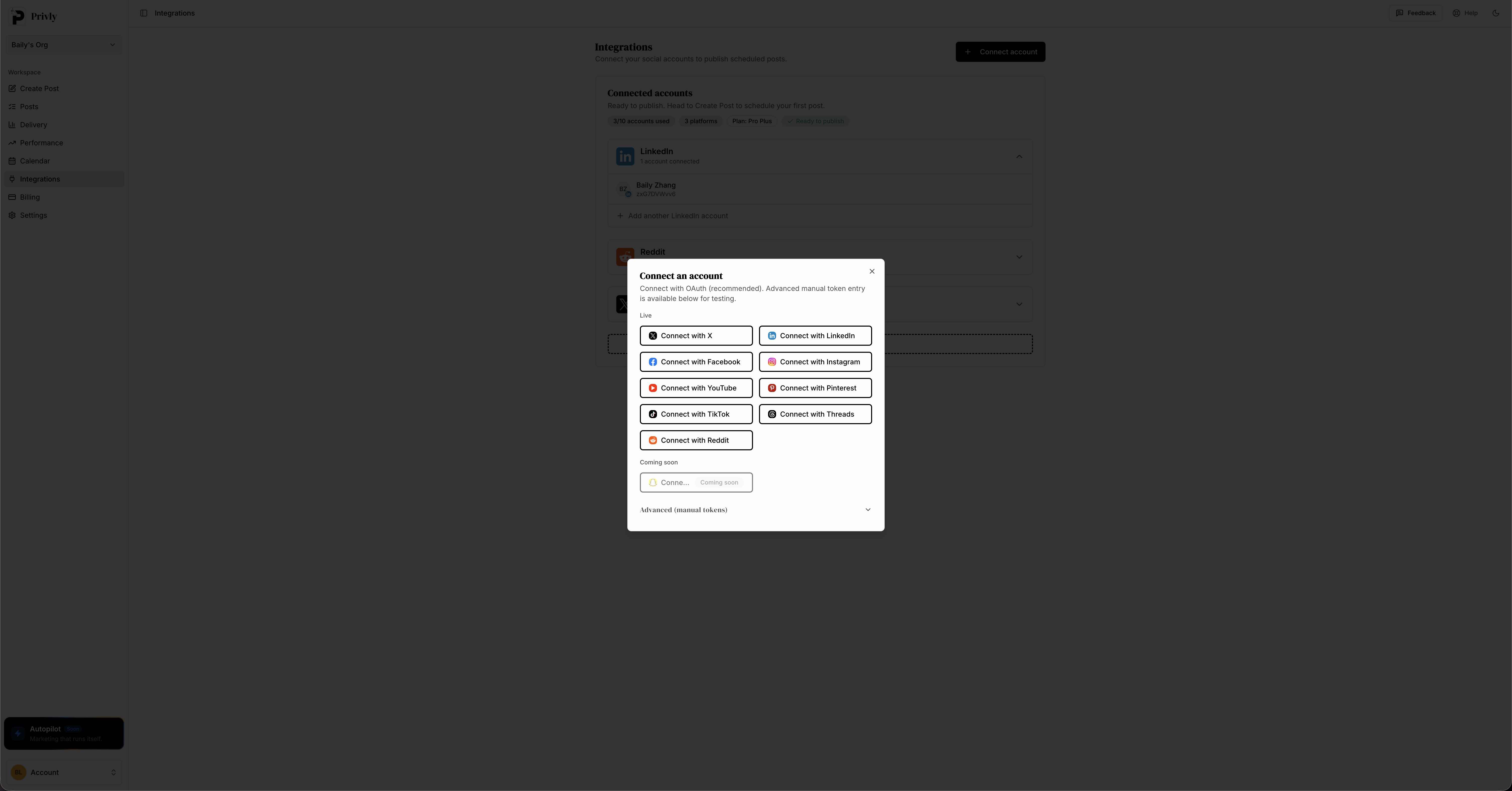
Connect 9+ social platforms in one click — no complicated setup required.
Best for: SaaS founders, lean marketing teams, solopreneurs who post on 3+ platforms
Pricing: Free plan available → Try Privly free
2. Later — best for visual content
Later has a strong Instagram-first DNA. The visual drag-and-drop calendar is excellent for brands where aesthetics matter — fashion, food, lifestyle.
Pros: Beautiful calendar UI, link-in-bio tool, Instagram Stories scheduling
Cons: Weaker LinkedIn/Twitter support, AI features are basic, pricier for full features
Best for: E-commerce brands and visual creators
3. Publer — best for value per feature
Publer packs in a lot — recycling, RSS auto-posting, bulk scheduling, link shortening — at a competitive price. It is not the most polished tool, but the feature-to-price ratio is strong.
Pros: Affordable, bulk upload, content recycling
Cons: UI feels dated, limited AI writing, smaller support community
Best for: Teams that want maximum features per dollar
4. Metricool — best for analytics-heavy teams
If data is your priority, Metricool goes deeper than Buffer on reporting. Competitor analysis, audience demographic breakdowns, and ad performance in one dashboard.
Pros: Excellent analytics, competitor tracking, ads integration
Cons: Scheduling UX is clunky, AI features are basic
Best for: Marketing agencies and data-driven teams
5. Hootsuite — enterprise option (expensive)
Hootsuite does everything Buffer does, and more. But pricing has moved sharply upmarket. For a small team, you are likely paying for features you will never use. See our full Hootsuite alternative analysis for details.
Pros: Robust, enterprise-grade, massive integration library
Cons: Very expensive for small teams, complex onboarding
Best for: Large marketing departments with budget to match
Direct comparison: Buffer vs Privly vs Later
| Feature | Buffer | Privly | Later |
|---|---|---|---|
| AI content generation | Basic | ✅ Native AI | Basic |
| Approval workflow | ❌ | ✅ | ❌ |
| Instagram Stories | ✅ | ✅ | ✅ |
| LinkedIn scheduling | ✅ | ✅ | Limited |
| TikTok support | ✅ | ✅ | ✅ |
| Threads support | ✅ | ✅ | ✅ |
| Team seats (entry plan) | 1 | Unlimited | 1 |
| Analytics depth | Basic | Medium | Medium |
| Free plan | ✅ | ✅ | ✅ |
Buffer alternative buyer guide: which tool should you choose?
The right answer depends on why Buffer stopped working for you.
| If your main problem is... | Choose a tool that prioritizes... |
|---|---|
| Blank-page writing | Native AI drafting and tone controls |
| Too much manual rewriting | Cross-platform adaptation |
| Team review | Approval workflow and shared workspace |
| Visual planning | Drag-and-drop calendar and media previews |
| Performance analysis | Strong reporting and audience insights |
| Cost creep | Predictable pricing and teammate-friendly plans |
For most small teams, the best upgrade path is not "the tool with the longest feature list." It is the tool that shortens the distance between idea and published post.
That is why Privly is strongest when your team wants creation and scheduling in one place. If your pain is purely visual Instagram planning, Later may be enough. If your pain is analytics, Metricool may deserve a close look. But if your pain is the daily production loop, Privly is the more direct fit.
How to switch from Buffer to Privly in 15 minutes
- Export your Buffer content — go to Buffer settings → export your queue as CSV
- Sign up at privly.app — connect your social accounts (takes under 2 minutes)
- Import your content calendar — paste your existing content or let AI regenerate similar posts
- Reconnect your integrations — Canva, Google Drive, RSS feeds
- Invite your team — add collaborators and set roles
You do not need to run both tools in parallel. Privly's onboarding is fast enough that you can cut over in a single afternoon.
Common mistakes when replacing Buffer
Migrating old clutter
Do not import every stale draft just because it exists. Use the switch as a cleanup moment. Bring over evergreen ideas, upcoming campaigns, and proven posts. Leave outdated drafts behind.
Choosing based only on monthly price
The cheapest tool is not always the lowest-cost tool. If it saves $20 but costs five hours of manual rewriting every month, it is not actually cheaper.
Ignoring team growth
Even if you are solo today, think about the next teammate. If adding a VA, designer, contractor, or cofounder makes the plan expensive or awkward, the tool may not scale with your workflow.
Treating AI as optional
AI is no longer only a nice extra for social media teams. It is becoming part of the production layer. Even if you edit heavily, AI can reduce the blank-page stage, generate variants, and help you keep a weekly cadence.
Forgetting reliability
A simpler tool still has to publish consistently. Before switching, check whether failed posts are easy to diagnose and whether each platform has clear status. Missed posts are not just technical issues; they break trust with your audience.
FAQ: choosing a Buffer alternative
What is the best Buffer alternative for small teams?
Privly is the strongest fit for small teams that want AI-assisted content creation, multi-platform scheduling, and a team-friendly workflow in one place.
Is Buffer still worth using in 2026?
Yes, if your workflow is simple and you only need a clean queue. If you need AI drafting, collaboration, and deeper cross-platform workflows, it may feel limited.
Should I switch from Buffer if I only post once a week?
Probably not. If your cadence is low and the workflow is not painful, the switching cost may not be worth it. Switch when content production becomes a recurring bottleneck.
What should I test before switching?
Test one real week of content. Draft posts, adapt them for each platform, schedule them, and compare how long the process takes against your Buffer workflow.
The bottom line
Buffer is a solid tool — but it was built for a simpler time. In 2026, small teams need AI baked into the writing process, not just the scheduling queue.
If your main frustrations are blank-page paralysis, too many manual steps, or per-seat costs adding up — Privly is the most direct upgrade. For a broader view, check our best social media management tool for small businesses guide.
More from the blog

Planable Alternative for Small Teams: 2026 Workflow
Compare Planable alternatives for small teams. Learn when Privly fits AI drafting, review, approvals, scheduling, and founder-led content workflows.
June 24, 2026 · Privly Team

Turn Customer Calls Into Social Media Posts With AI
Learn how to turn customer calls into social media posts with AI. Extract buyer language, objections, proof, and founder context into reviewed posts.
June 24, 2026 · Privly Team

Metricool Alternative for Small Teams: 2026 Workflow
Compare Metricool alternatives for small teams. Learn when to choose Privly for AI drafting, review, scheduling, and founder-led distribution workflows.
June 23, 2026 · Privly Team